Introduction
Imagine a world where you don’t have to manage servers, worry about scaling infrastructure, or deal with unnecessary operational overhead. Welcome to AWS Lambda, an event-driven, serverless computing service provided by Amazon Web Services (AWS) that allows you to run code without provisioning or managing infrastructure. With AWS Lambda, you can focus on your code while the service automatically handles the scaling and execution.
AWS Lambda is transforming how developers deploy and manage applications by enabling them to focus purely on writing code. Whether you’re automating tasks, handling API requests via API Gateway in AWS, or processing streaming data, AWS Lambda provides a cost-efficient, highly scalable solution.
In this guide, we’ll walk you through building your first AWS Lambda in four easy steps:
- Understanding AWS Lambda and Serverless Computing
- Setting Up Your AWS Environment
- Writing Your First Lambda Function
- Triggering and Monitoring Your Lambda Function
By the end of this tutorial, you’ll have hands-on experience with AWS Lambda and be ready to leverage serverless frameworks for your own projects.
Step 1: Understanding AWS Lambda and Serverless Computing
What is AWS Lambda?
AWS Lambda is a serverless compute service that lets you run code in response to events without provisioning or managing servers. You upload your code, configure triggers, and AWS Lambda takes care of execution and scaling.
Key features of AWS Lambda:
- Fully managed execution environment
- Automatic scaling and AWS Lambda pricing is based on execution time
- Supports multiple runtimes (Python, Node.js, Go, Java, etc.)
- Seamless integration with Amazon Web Services (AWS), such as API Gateway in AWS, S3, DynamoDB, etc.
Why Go Serverless?
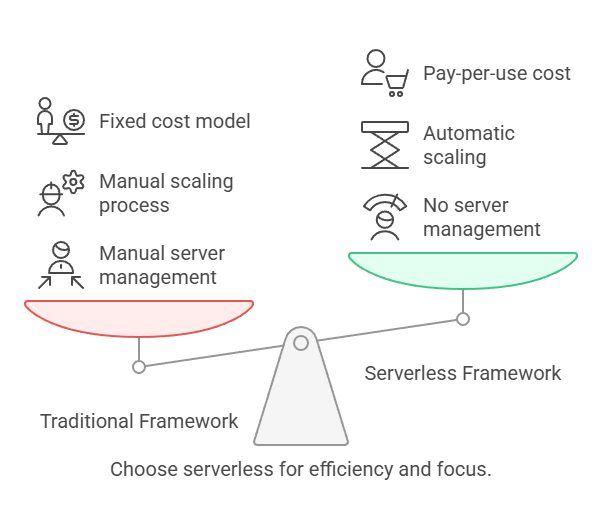
Traditional server-based applications require managing infrastructure, scaling, and maintenance. Serverless frameworks eliminate these concerns, providing:
- Cost efficiency: Pay only for execution time, reducing idle costs (AWS Lambda cost is based on actual usage).
- Scalability: It automatically scales up or down based on demand.
- Reduced operational complexity: No need to manage servers or infrastructure.
Use Cases of AWS Lambda
AWS Lambda functions are widely used for various tasks, including:
- Processing S3 events: Automatically resizing images when uploaded to an S3 bucket.
- API-driven applications: Handling RESTful API requests via API Gateway in AWS.
- Data processing: Filtering and transforming data streams from Kinesis or DynamoDB.
- Automation: Scheduling periodic tasks such as backups and log processing.
Step 2: Setting Up Your AWS Environment
Creating an AWS Account
If you don’t have an AWS account yet, sign up at AWS. The AWS Free Tier provides ample resources for testing AWS Lambda functions.
Configuring IAM Permissions
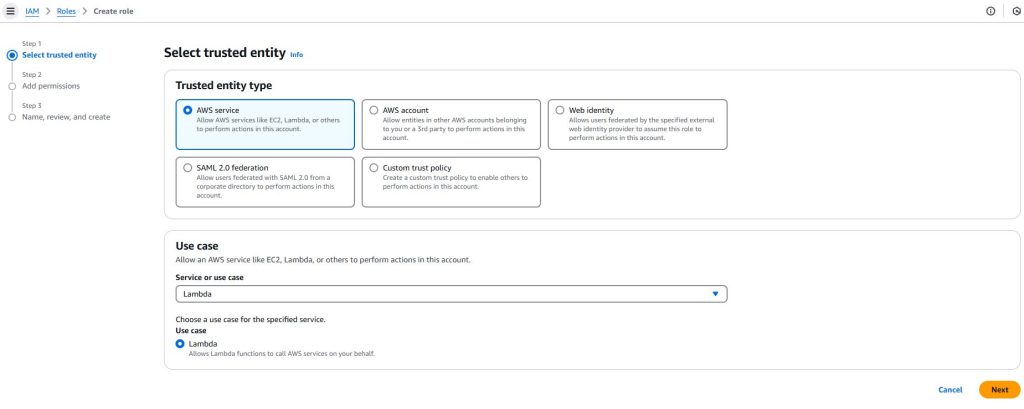
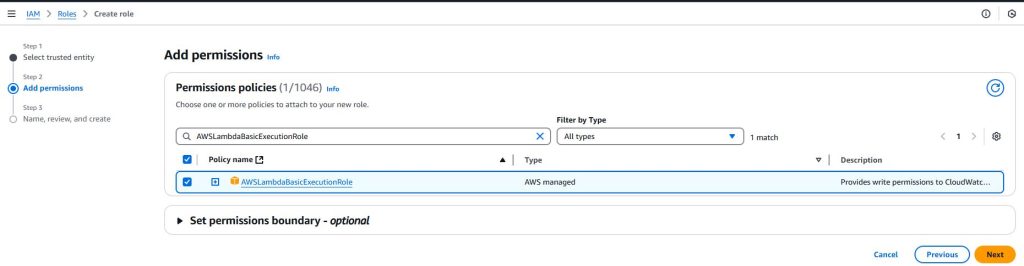
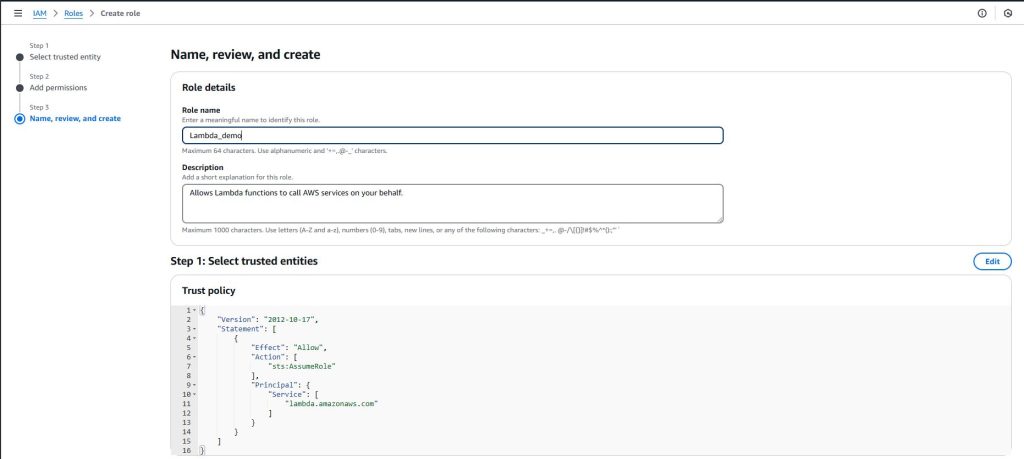
Before creating a Lambda function, you need an IAM role with permissions to execute functions.
- Open the AWS Management Console and navigate to IAM (Identity and Access Management).
- Create a new role and choose AWS Lambda as the service.
- Attach the AWSLambdaBasicExecutionRole policy.
- Name the role and create it.
Installing AWS CLI and Setting Up Credentials
For command-line deployment and management, install the AWS CLI:
- Download and install the AWS CLI from the official site.
- Configure it with your credentials:
aws configureEnter your AWS Access Key, Secret Key, Region, and output format.
Step 3: Writing Your First AWS Lambda Function
Choosing a Runtime and Writing the Function Code
AWS Lambda supports multiple runtimes, including Python, Node.js, Java, and Go. Let’s create a simple Lambda function in Python:
def lambda_handler(event, context):
    return {
        'statusCode': 200,
        'body': 'Hello from AWS Lambda!'
    }
Testing Your Function Locally
Before deploying, you can test your function using AWS SAM (Serverless Application Model):
sam local invoke "HelloWorldFunction" -e event.jsonAlternatively, you can test it using the AWS Lambda console by manually invoking it.
Deploying the Function Using AWS Console and CLI
Using AWS Console:
- Go to AWS Lambda service and click Create Function.
- Choose Author from scratch, name your function, select a runtime (Lambda in Python or Java), and assign the IAM role created earlier.
- Paste your function code in the editor.
- Click Deploy and Test to see the output.
Using AWS CLI: If you prefer automation, deploy your function with the following command:
aws lambda create-function --function-name HelloWorld \
--runtime python3.9 --role <your-role-arn> \
--handler lambda_function.lambda_handler --zip-file fileb://function.zip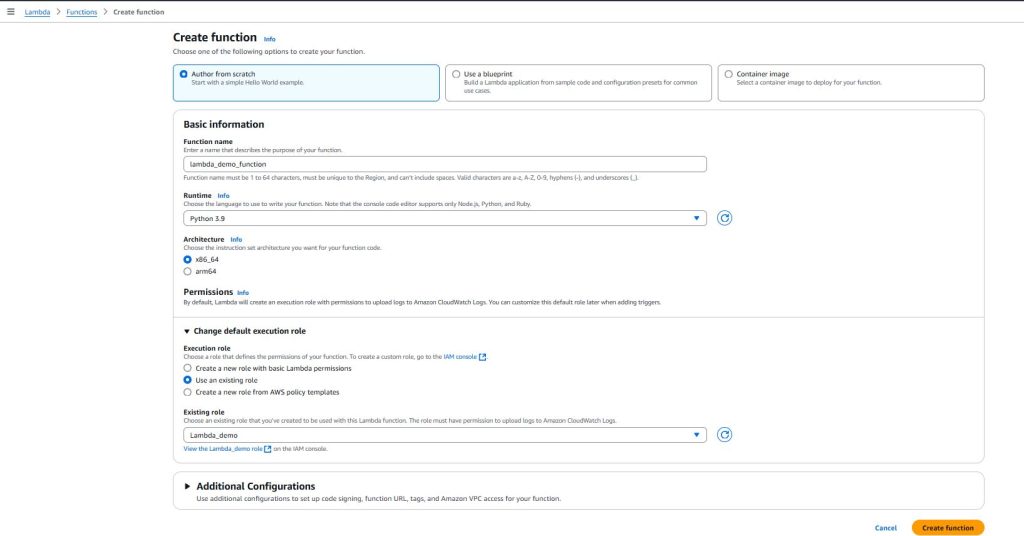

Step 4: Triggering and Monitoring Your AWS Lambda Function
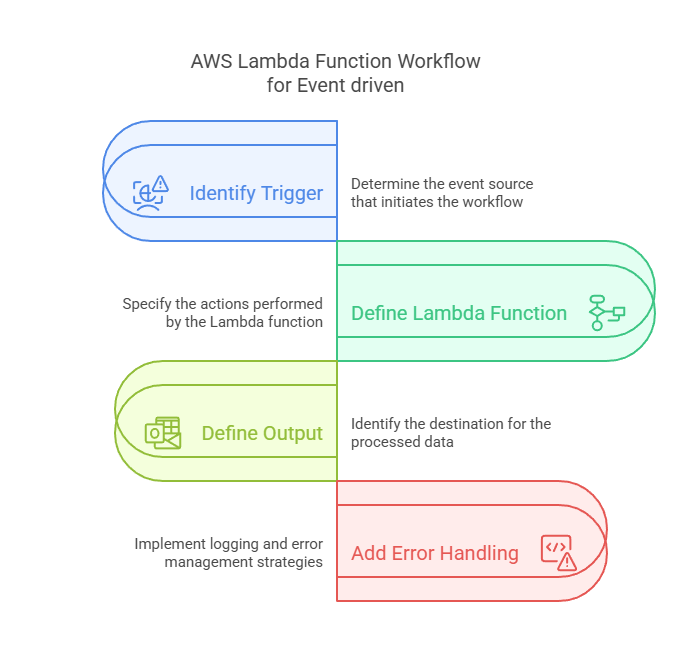
Connecting Lambda to Event Sources
You can trigger Lambda functions using various Amazon Web Services (AWS):
- API Gateway in AWS: Create a REST API endpoint for Lambda invocation.
- S3 Events: Trigger a function when a file is uploaded.
- CloudWatch Events: Automate scheduled jobs.
Monitoring and Debugging Lambda Functions
AWS offers built-in monitoring tools that make it easy to track performance, identify issues, and optimize your resources. These tools help ensure your applications run smoothly and efficiently.
- CloudWatch Logs: View execution logs.
- CloudWatch Metrics: Monitor execution time, error rates, and memory usage.
- AWS X-Ray: Trace function execution for performance optimization.
If you guys need full toturial on AWS Monitoring services. Please comment me with your topic suggestions.
Check logs using AWS CLI:
aws logs tail /aws/lambda/HelloWorld --followOptimizing Performance and Cost
- Minimize cold starts by using provisioned concurrency.
- Optimize memory allocation to balance performance and cost of AWS Lambda.
- Use asynchronous execution for background tasks.
Conclusion
Congratulations! You have successfully deployed your first AWS Lambda. In this guide, we covered:
- The basics of AWS Lambda and why serverless frameworks are beneficial.
- Setting up an AWS environment and configuring IAM roles.
- Writing, testing, and deploying your Lambda function.
- Connecting Lambda to event sources and monitoring execution.
AWS Lambda is a powerful tool that simplifies application deployment and automation. Whether you’re building APIs, processing data, or automating workflows, Lambda cloud can help you scale efficiently.
Mastering AWS Lambda is a big step toward modern cloud-native development. Keep exploring, building, and refining your skills. With each experiment, you’ll gain deeper insights and improve your expertise.
What Next’s
✅ Give it a try! Create a Python-based Lambda function that handles S3 file uploads and logs metadata to CloudWatch. This hands-on project will help you understand AWS Lambda’s event-driven architecture effectively.
💬 Get involved in the discussion! If you have questions or want to share your experience with AWS Services, drop a comment below. Your insights can help others and spark meaningful conversations in the community. Let’s learn and grow together!
Explore my other articles on DevOps and Cloud for more insights, tips, and tutorials. Stay informed and enhance your skills with practical content designed to boost your knowledge. Happy learning!