1. Introduction
Amazon S3 bucket storage is a powerful and scalable solution for storing vast amounts of data in the cloud. However, misconfigured S3 buckets can lead to data breaches, unauthorized access, and compliance risks. Securing your S3 bucket is essential to protect sensitive information, prevent cyber threats, and ensure regulatory compliance.
In this guide, we’ll explore the best S3 bucket security practices, including access control, encryption, logging, and monitoring. By implementing these measures, you can safeguard your data while maintaining optimal performance and scalability. Whether you’re storing critical business files or hosting static websites, following S3 bucket security best practices is crucial to mitigate risks and strengthen cloud security. Let’s dive in!
2. AWS S3 Bucket
Amazon S3 or Simple Storage Service is a popular cloud storage service for backup, websites, big data, and content delivery. Misconfigured S3 buckets, though, constitute a huge security threat, resulting in data leakages and compliance failures. Cybercriminals continuously hunt for vulnerable buckets, taking advantage of misconfigurations to make unauthorized access to data or modify it. Businesses must implement controls on access, encryption, and monitoring for safeguarding sensitive cloud assets in order to avoid security breaches.
3. Ensuring S3 Bucket Security: A Critical Priority
Protecting your S3 bucket is important to avoid unauthorized access, data exposure, and compliance issues. Misconfigured buckets can leak sensitive data, which is an easy target for hackers. Several high-profile data breaches have happened because of public access misconfigurations, resulting in financial loss and reputational damage. With stringent regulations such as GDPR and HIPAA, organizations need to implement access controls, turn on encryption, and track bucket activity. By using good security best practices, companies can safeguard their data, ensure customer trust, and minimize the threat of cyber attacks in today’s more digital age. Don’t expose your S3 bucket!
4. S3 Bucket Security Best Practices
Let’s delve into seven key security best practices that will safeguard your S3 bucket and secure your data against unauthorized access, breaches, and cyber attacks. Following these practices will improve security, compliance, and data integrity in the cloud.
4.1 Restrict Public Access to Prevent Data Exposure
One of the biggest security risks with Amazon S3 buckets is accidental public exposure, which can lead to data leaks, compliance violations, and cyberattacks. Many high-profile breaches have occurred due to misconfigured publicly accessible S3 buckets, allowing anyone on the internet to access sensitive files. To prevent such risks, AWS provides the S3 Block Public Access feature, which allows you to restrict public access at the account or bucket level.
To Enable this, follow below steps:
- Navigate to your S3 bucket settings in the AWS Management Console.
- go to Permissions > Block Public Access
- enable all options to block new and existing public permissions as shown below.
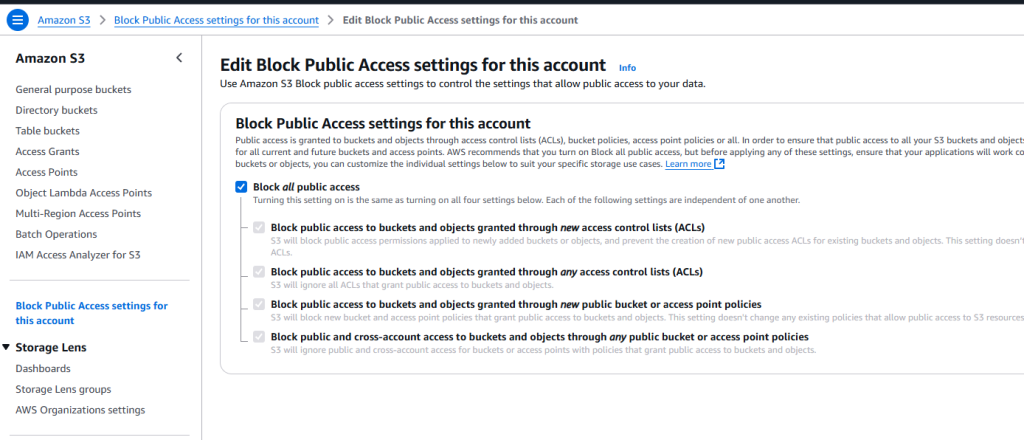
You can also apply these settings using the AWS CLI with use below command
aws s3api put-public-access-block --bucket <your-bucket-name> --public-access-block-configuration BlockPublicAcls=true,IgnorePublicAcls=true,BlockPublicPolicy=true,RestrictPublicBuckets=true
After configuring these settings, it’s essential to verify public access using tools like AWS Security Hub and the AWS CLI. As shown in below code.
aws s3 ls s3://<your-bucket-name> --human-readable --summarize
Regularly monitoring and enforcing block public access policies ensures that your S3 data remains private, secure, and compliant with industry standards.
4.2 Enforce Least Privilege Access with IAM Policies
Securing your S3 bucket requires a clear understanding of IAM policies and bucket policies, which control access to your data. IAM policies (identity-based permissions) are attached to users, groups, or roles, defining what actions they can perform on S3. In contrast, bucket policies (resource-based permissions) are applied directly to the S3 bucket, specifying who can access it and under what conditions.
To ensure security, follow best practices for cross-account access by granting least privilege permissions, using AWS IAM roles instead of sharing credentials, and enabling AWS Organizations SCPs to enforce security policies. Additionally, prevent unauthorized changes by using S3 bucket versioning, MFA delete, and AWS IAM conditions to restrict actions based on specific criteria. Properly configuring these policies helps maintain strict access control, prevent accidental data exposure, and enhance security across AWS accounts
Here is a comparison table of Resource-Based and Identity-Based Permissions to help you better understand their differences.
| Feature | Resource-Based Permissions | Identity-Based Permissions |
|---|---|---|
| Definition | Permissions applied directly to an AWS resource (e.g., S3 bucket policy) | Permissions assigned to IAM identities (users, groups, or roles) |
| Scope | Controls who can access the resource and what actions they can perform | Defines what actions an identity can take on AWS resources |
| Attachment | Attached to the resource (e.g., S3 bucket, Lambda function) | Attached to IAM users, groups, or roles |
| Cross-Account Access | Supports granting access to external AWS accounts | Typically limited to identities within the same AWS account unless IAM roles are used |
| Use Case | Controlling access at the resource level without modifying IAM policies | Granting specific permissions to AWS users, roles, or groups |
| Example | S3 bucket policy allowing access to a specific user | IAM role granting read access to all S3 buckets |
4.3 Encrypt Your Data at Rest and In-Transit
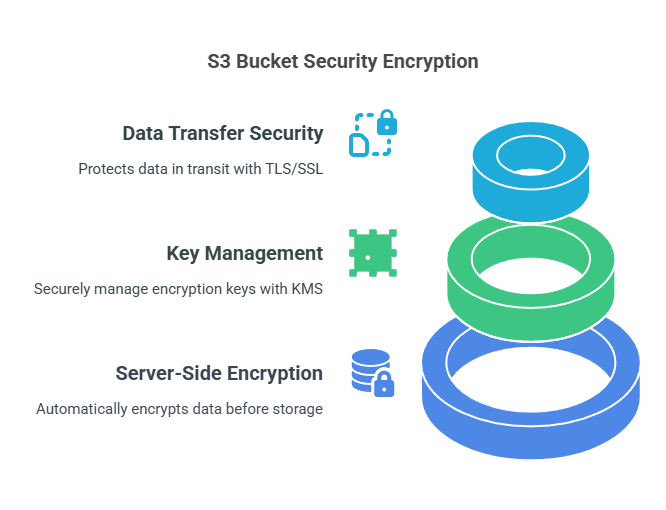
Encryption of your S3 bucket is a significant step in protecting sensitive information from unauthorized users and cyber attacks. AWS offers several encryption features to secure data at rest and in transit to meet security requirements. Ranging from server-side encryption (SSE) to TLS/SSL for encrypted data transfer, deploying these controls ensures the protection of your data and prevents data breaches. Let’s discuss the main encryption methods to enhance your S3 bucket security.
- Securing S3 Buckets with Server-Side Encryption
Encrypting your S3 bucket is essential to protect data from unauthorized access. Server-Side Encryption (SSE) ensures that data is automatically encrypted before being stored and decrypted when accessed. AWS offers three encryption options: SSE-S3, where AWS manages the encryption keys; SSE-KMS, which integrates with AWS Key Management Service (KMS) for added control; and SSE-C, where customers provide their own encryption keys. SSE-KMS is recommended for better key management, access control, and auditing, ensuring stronger data security and compliance. - Managing Encryption Keys with AWS KMS
AWS Key Management Service (KMS) allows you to create, control, and manage encryption keys securely. When using SSE-KMS, you can define key policies, restrict access, and audit key usage through AWS CloudTrail. KMS also supports customer-managed keys (CMKs) for greater control over key lifecycle management. To enhance security, it’s best to limit key permissions, enable automatic key rotation, and use IAM policies to prevent unauthorized access. Proper key management ensures encrypted data remains secure even if access controls are misconfigured. - Enabling TLS/SSL for Secure Data Transfers
Data security isn’t just about encryption at rest—it’s also crucial to protect data in transit. AWS S3 supports TLS/SSL encryption, ensuring all data transferred between clients and S3 is secure from interception or tampering. To enforce secure communication, always use HTTPS (TLS 1.2 or higher) when accessing S3 and configure bucket policies to reject unencrypted requests. Additionally, enabling S3 default encryption with SSE-KMS ensures end-to-end protection, securing data both in transit and at rest. Implementing these encryption practices significantly reduces the risk of data breaches and unauthorized access.
4.4 Enhancing S3 Bucket Security with Versioning and MFA Delete
To protect your S3 bucket from accidental deletions or unauthorized changes, enabling S3 Versioning and MFA Delete is essential. These features add an extra layer of security by maintaining previous versions of objects and requiring multi-factor authentication for deletion. Implementing these settings ensures better data recovery, prevents accidental loss, and strengthens security against malicious actions. Let’s explore how these features work and how to enable them for your S3 buckets.
- Preventing Data Loss with S3 Versioning
S3 Versioning allows you to retain multiple versions of an object, preventing accidental overwrites or deletions. If a file is mistakenly modified or deleted, you can easily restore a previous version. This feature is particularly useful for critical business data, compliance requirements, and disaster recovery. However, enabling versioning increases storage costs, so it’s best to set up lifecycle policies to delete old versions automatically. - Enhancing Security with MFA Delete
For additional protection, AWS offers MFA Delete, which requires a multi-factor authentication (MFA) code before permanently deleting objects or disabling versioning. This prevents unauthorized deletions by adding an extra verification step. To enable MFA Delete, use the AWS CLI with the following command.
aws s3api put-bucket-versioning --bucket <your-bucket-name> --versioning-configuration Status=Enabled,MFADelete=Enabled --mfa "SERIAL_NUMBER MFA_CODE"
By combining S3 Versioning and MFA Delete, you can protect critical data, reduce accidental deletions, and enhance security in your AWS environment.
4.5 Strengthening S3 Bucket Security with Logging and Monitoring
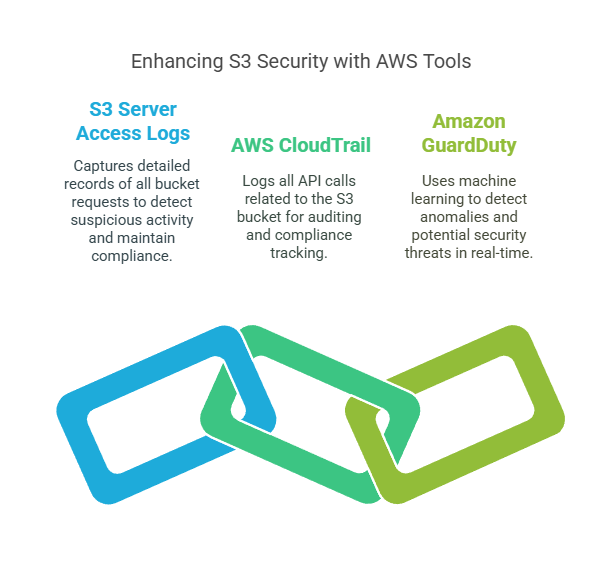
Monitoring your S3 bucket is crucial for detecting unauthorized access, tracking activity, and identifying security threats. AWS provides powerful logging and monitoring tools like S3 Server Access Logs, AWS CloudTrail, and Amazon GuardDuty to help you gain insights into bucket usage and potential risks. Implementing these security measures ensures better visibility, compliance, and proactive threat detection. Let’s explore how these features can enhance your S3 security.
- Tracking Requests with S3 Server Access Logs
S3 Server Access Logs capture detailed records of all requests made to your bucket, including who accessed the data, when, and from where. These logs help detect suspicious activity, troubleshoot issues, and maintain compliance. To enable access logging, navigate to your S3 bucket settings, enable server access logging, and specify a target bucket for storing logs. Regularly reviewing these logs helps identify unauthorized access attempts and improve security policies. - Auditing API Activity with AWS CloudTrail
AWS CloudTrail logs all API calls related to your S3 bucket, including actions performed by IAM users, roles, or AWS services. CloudTrail records essential details like event timestamps, IP addresses, and request parameters, making it an invaluable tool for auditing, forensic investigations, and compliance tracking. Enabling CloudTrail ensures that every S3-related API action is logged, monitored, and available for security analysis. - Detecting Threats with Amazon GuardDuty
Amazon GuardDuty uses machine learning to analyze CloudTrail logs and detect anomalies, unusual access patterns, and potential security threats in your S3 bucket. It can identify suspicious data access, brute-force attempts, and unauthorized changes, helping you respond to threats in real time. To enable GuardDuty, go to the AWS Security Hub, activate the service, and configure alerts for proactive threat detection.
4.6 Enhancing S3 Security with VPC Endpoints
Restricting access to your S3 bucket using VPC Endpoints helps keep data transfers private and secure within your AWS environment. Instead of routing traffic over the public internet, VPC Endpoints allow direct, private communication between your Amazon VPC and S3, reducing exposure to security threats. By properly configuring S3 Gateway Endpoints and VPC Endpoint policies, you can prevent unauthorized access and ensure only trusted resources can interact with your bucket. Let’s explore how to implement these security measures.
- Keeping Traffic Private with VPC Endpoints
VPC Endpoints eliminate the need for internet gateways, NAT devices, or VPNs by enabling secure, private connections to AWS services like S3. This reduces the risk of data interception, unauthorized access, and exposure to external threats. By using S3 Gateway Endpoints, organizations can enforce strict access controls while ensuring faster and more secure data transfers within their AWS environment. - Configuring an S3 Gateway Endpoint
To set up an S3 Gateway Endpoint, follow below steps:- navigate to the AWS VPC console,
- create an endpoint for S3, and associate it with your VPC route table.
This ensures that all S3 traffic remains within AWS’s internal network, preventing access from unauthorized external sources. Additionally, you can use IAM policies to further limit who can access your bucket via the endpoint, enhancing security.
- Applying VPC Endpoint Policies for Access Control
VPC Endpoint policies allow you to define fine-grained access controls, ensuring only specific VPCs, IAM roles, or services can access your S3 bucket. For example, you can create a policy that permits only trusted applications or users to interact with your data while blocking all other requests. Applying strict endpoint policies ensures minimal attack surface, compliance with security best practices, and enhanced data protection.
If you have any issue while configuring S3 gateway. Please check this free resource.
4.7 Use Object Lock and Lifecycle Policies for Data Integrity
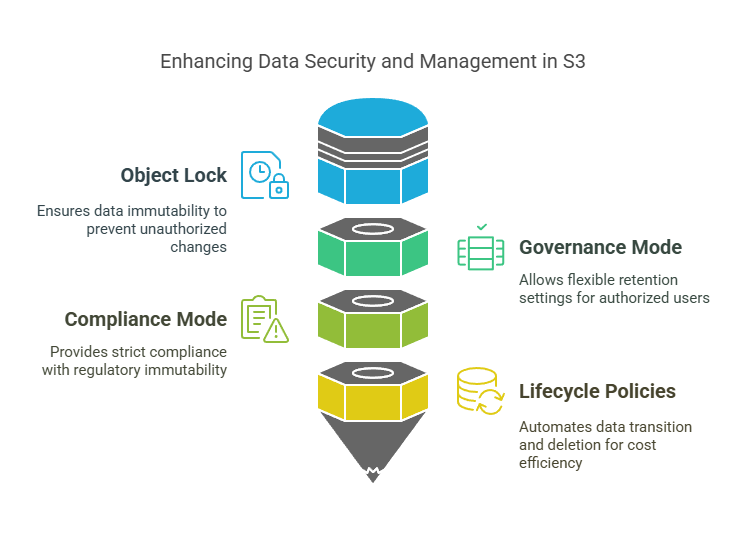
Preserving data integrity in Amazon S3 protects important information against accidental deletion, unauthorized modification, or compliance errors. S3 Object Lock makes objects stored with it immutable so that they cannot be modified or deleted during a specified retention duration. It aids organizations in preserving sensitive information against tampering so that it is reliable in the long term.
S3 Object Lock provides two modes: Governance Mode, where specific users can be granted permission to update retention settings if necessary, and Compliance Mode, which is hard immutability, even for administrators, suitable for regulatory compliance.
Apart from immutability, S3 Lifecycle Policies facilitate effective storage management by automating the transition of objects between storage classes and scheduling safe deletions. For instance, data may be transitioned from Standard to Glacier Deep Archive after a specific period, cutting costs while ensuring preservation. With Object Lock and Lifecycle Policies used in tandem, organizations can enhance data security, deter unauthorized changes, and achieve efficient storage costs.
5 Conclusion
Securing your Amazon S3 buckets is crucial to protecting sensitive data and preventing unauthorized access. In this guide, we explored seven essential security practices to enhance your S3 security posture:
- Restrict Public Access to Prevent Data Exposure – Prevents accidental data leaks by blocking public access settings.
- Enforce Least Privilege Access with IAM Policies – Ensures users have only the permissions they need.
- Encrypt Your Data at Rest and In-Transit – Protects sensitive data using encryption mechanisms like SSE and TLS/SSL.
- Enable Versioning and MFA Delete for Data Protection – Safeguards against accidental deletions and unauthorized changes.
- Implement Logging and Monitoring for Security Insights – Enables tracking and auditing with S3 Server Access Logs, CloudTrail, and GuardDuty.
- Restrict Access to S3 Buckets with VPC Endpoints – Keeps S3 traffic within AWS’s private network, preventing external exposure.
- Use Object Lock and Lifecycle Policies for Data Integrity – Ensures data immutability and automates storage management.
Beyond implementing these best practices, regular security audits and compliance checks are essential to identifying vulnerabilities and strengthening cloud security. AWS tools like Security Hub, CloudTrail, and GuardDuty provide continuous monitoring and threat detection.
Security is an ongoing process—by adopting AWS security best practices and proactively monitoring access and configurations, organizations can protect their S3 data, maintain compliance, and reduce the risk of breaches
Next Task
Now that you’ve explored essential S3 security best practices, take the next step by automating your S3 security audits for continuous protection. You can do this by:
- Enabling AWS Security Hub to detect misconfigurations.
- Setting up AWS Config Rules to enforce security policies like encryption and access restrictions.
- Automating security checks using AWS Lambda and CloudWatch Alarms.
- Generating S3 security reports to monitor compliance regularly.
💬 Get involved in the discussion! If you have questions or want to share your experience with AWS Services, drop a comment below. Your insights can help others and spark meaningful conversations in the community. Let’s learn and grow together!
Explore my other articles on DevOps and Cloud for more insights, tips, and tutorials. Stay informed and enhance your skills with practical content designed to boost your knowledge. Happy learning!