Terraform State –A Complete Guide for 2025

1. Introduction
Terraform State is a core component of Infrastructure as Code that maintains information about resources and their configurations after deployment. It serves as a single source of truth so that Terraform knows how much infrastructure already exists and what changes should be made. Without managing state, Terraform would not be able to determine the current state of resources, which would result in inconsistencies, possible duplications, or even unintended deletions. With its up-to-date record of infrastructure, Terraform State facilitates efficient automation, better collaboration, and trusted infrastructure provisioning.
Terraform State is crucial in the management and monitoring of deployed infrastructure by keeping a structured record of all resources in Terraform’s control. It keeps metadata on each resource, such as its attributes, dependencies, and current configuration, which enables Terraform to figure out what needs to be changed when it runs in the future. Without Terraform State, the tool would not be able to see what exists, and it could end up duplicating resources, misconfiguring them, or deleting them unintentionally.
By tracking infrastructure state, Terraform makes each change apply consistently and predictably. It also facilitates dependency management, avoiding conflicts, and smooth collaboration between teams. With several engineers working on shared infrastructure, state locking avoids simultaneous changes, minimizing corruption risks. Terraform State also includes remote storage backends, which allow easy distribution of state files securely between teams. Correct management of Terraform State is necessary for achieving stability and efficiency in Infrastructure as Code processes.
In this blog, you will gain a comprehensive understanding of Terraform State and its significance in infrastructure management. We will also explore the following key topics:
- Why Terraform Requires a State File?
- How Terraform Tracks Infrastructure Changes?
- Understanding the Terraform State File
- Local vs. Remote Terraform State
- Effective State Management Strategies
- Handling State File Corruption
- Essential Terraform State Commands
- Best Practices for Managing Terraform State
- Troubleshooting Common Terraform State Issues
2. Terraform State
Terraform state is a file (terraform.tfstate) that tracks the current infrastructure managed by Terraform. It stores resource metadata, dependencies, and configurations, enabling Terraform to determine changes efficiently. State helps with synchronization, collaboration, and rollback but must be secured using remote backends like AWS S3 with state locking for reliability.
2.1 How Terraform tracks infrastructure changes?
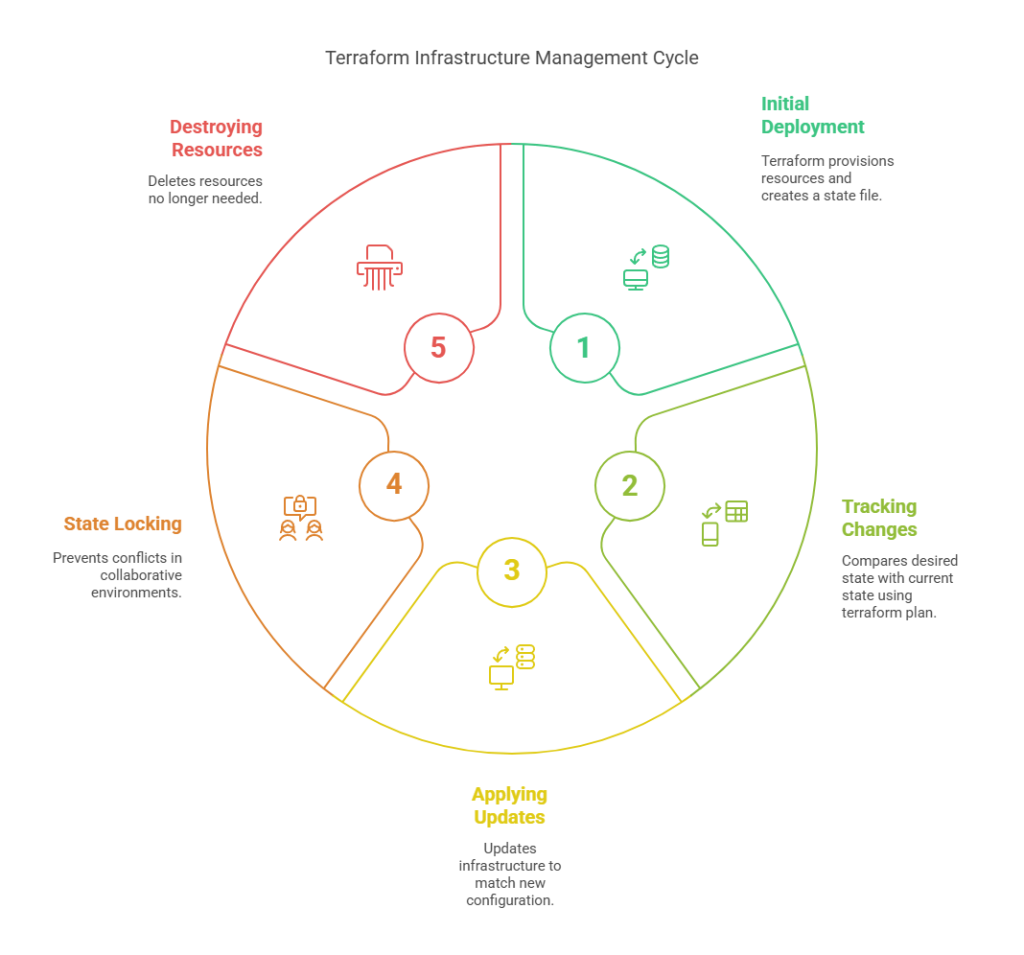
Terraform tracks infrastructure changes using the Terraform state file (terraform.tfstate), which acts as a source of truth for managed resources. When Terraform runs, it compares the current state of infrastructure with the desired configuration defined in the .tf files. This process helps identify what needs to be created, updated, or destroyed.
How It Works:
1. Initial Deployment:
When you run terraform apply for the first time, Terraform provisions resources and creates a state file to store information about them.
2. Tracking Changes:
If you modify your Terraform configuration (e.g., changing an instance type or adding a new resource), Terraform uses terraform plan to compare the desired state with the current state in the terraform.tfstate file.
3. Applying Updates:
If there are differences between the Terraform configuration and the state file, terraform apply updates the infrastructure to match the new configuration.
4. State Locking:
To prevent conflicts in collaborative environments, Terraform supports state locking with remote backends like AWS S3 and DynamoDB.
5. Destroying Resources:
If a resource is removed from the configuration, Terraform identifies it as no longer needed and deletes it upon applying changes.
By maintaining this state file, Terraform ensures consistency, minimizes drift, and automates infrastructure management efficiently.
2.2 The role of state in mapping real-world resources to Terraform configuration
Terraform state is used to map infrastructure resources in the real world to their equivalent Terraform configuration. When Terraform creates resources, it saves their metadata in the terraform.tfstate file, which is used as a reference for updates in the future. The state file helps Terraform understand what is present and avoid creating duplicate resources or deleting them by mistake. With consistent mapping, Terraform effectively tracks changes, and updates and changes can be smoothly made. Without state management, Terraform would need to constantly ask cloud providers for information, slowing down deployments. State also supports more advanced features like dependency resolution, remote backends, and team collaboration, allowing infrastructure automation to be more scalable and reliable.
2.3 simple Terraform state file
Here is an example of a simple Terraform state file (terraform.tfstate) that tracks an AWS EC2 instance:
{
  "version": 4,
  "terraform_version": "1.5.0",
  "resources": [
    {
      "mode": "managed",
      "type": "aws_instance",
      "name": "web",
      "provider": "provider[\"registry.terraform.io/hashicorp/aws\"]",
      "instances": [
        {
          "schema_version": 0,
          "attributes": {
            "id": "i-1234567890abcdef0",
            "ami": "ami-0abcdef1234567890",
            "instance_type": "t2.micro",
            "availability_zone": "us-east-1a",
            "tags": {
              "Name": "MyWebServer"
            }
          }
        }
      ]
    }
  ]
}
Let’s break down the above file and analyze its functionality.
version: The state file version.terraform_version: The Terraform version that generated this state.resources: A list of managed resources.type: Specifies the resource type (aws_instancein this case).name: The logical name of the resource (web).attributes: Stores key properties of the EC2 instance, such as instance ID, AMI, instance type, and tags.
This state file allows Terraform to track and manage changes efficiently while ensuring consistency between the declared infrastructure and the actual deployed resources.
3. Why Terraform Needs a State File?
Terraform requires a state file (terraform.tfstate) to keep a record of the mapping between the infrastructure declared in the configuration files and the resources actually created in the cloud or on-premises. Without a state file, Terraform would not be able to keep track of existing infrastructure, resulting in inefficiencies and possible conflicts when making changes. State file enables Terraform to sense the changes, know what needs updating, and only apply the necessary changes instead of re-provisioning everything. It also has support for functionalities such as resource dependencies, performance tuning, and collaboration via remote state storage to ensure that the teams are using the latest state of infrastructure.
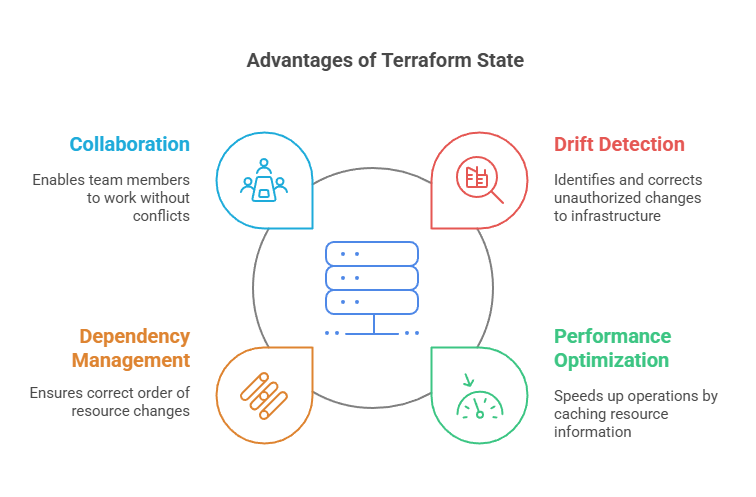
3.1 Advantages of Terraform State
- Drift Detection – Terraform state helps identify configuration drift, which occurs when changes are made to infrastructure outside of Terraform. By comparing the actual infrastructure with the state file, Terraform can detect unintended modifications and provide insights to restore consistency.
- Performance Optimization – Terraform caches resource information in the state file, which speeds up the
terraform planandterraform applyprocesses. Instead of querying the cloud provider every time, Terraform reads from the state file, reducing API calls and improving efficiency. - Dependency Management – The state file maintains relationships between resources, ensuring Terraform understands dependencies. This helps Terraform apply changes in the correct order, preventing issues like deleting a VPC before its associated subnets are removed.
- Collaboration – By storing the state file remotely (e.g., in AWS S3, Terraform Cloud, or HashiCorp Consul), multiple team members can work on infrastructure without conflicts. Remote state storage also enables state locking, preventing simultaneous updates that could lead to inconsistencies.
4. Understanding the Terraform State File
Now, let’s explore and gain a detailed understanding of the Terraform state file.
4.1 Anatomy of a Terraform State File
A Terraform state file (terraform.tfstate) is a JSON-file that stores information about all managed resources. It holds important information such as resource types, attributes, dependencies, and metadata. The most important sections are:
- Version – Indicates the version of Terraform used to create the state file.
- Terraform Configuration – Maintains the root module and any child modules used during the deployment.
- Resources – Provides a list of each resource Terraform is managing, such as its ID, attributes, and dependencies.
- Outputs – Extracts values set in the Terraform configuration and makes them available for use within other modules.
This formal structure makes Terraform aware of the existing infrastructure state, allowing proper planning and updating.
4.2 What Information is Stored in the State File?
The Terraform state file (terraform.tfstate) stores detailed information about all managed infrastructure resources. It includes:
- Resource Identifiers – Unique IDs for each resource, such as an AWS EC2 instance ID or an S3 bucket name.
- Resource Attributes – Configuration details, including IP addresses, instance types, and security group rules.
- Dependencies – The relationships between resources, ensuring Terraform applies changes in the correct order.
- Module and Provider Data – Information about used modules and providers, maintaining consistency.
- Outputs – Captured values that can be referenced in other configurations.
This data helps Terraform track, update, and manage infrastructure efficiently.
4.3 How Terraform Reads and Updates the State File
Terraform takes a read from the state file (`terraform.tfstate`) to know the existing infrastructure setup before making any updates. During execution of `terraform plan`, Terraform contrasts the state file with the current cloud infrastructure and the target setup in the `.tf` files. In case there are differences, Terraform produces an execution plan to bridge the gap.
At `terraform apply`, Terraform updates the infrastructure as necessary and also updates the state file to match the current configurations of resources. This provides consistency, avoids drift, and allows Terraform to follow dependencies, relationships, and metadata across deployments, making the management of infrastructure more dependable and automated.
5. Local vs. Remote Terraform State
5.1 Local State
Local state in Terraform is the default mechanism by which Terraform keeps and stores infrastructure state. If you don’t specify anything else, Terraform will store this state in a file called in your working directory. The file is used as the point of truth for Terraform for the infrastructure that it’s in charge of managing—it tracks resources you’ve deployed, their settings, and relationships between them.
Key Features of Remote State:
- File-Based Storage: Local state is stored in the file, and this file should be kept secure because it may contain sensitive information, such as resource IDs and secrets.
- Single User Context: Local state works well for individual users or small-scale projects where collaboration isn’t required.
- Locking Limitations: Unlike remote state (stored in backends like S3, Azure Blob, or Terraform Cloud), local state doesn’t provide state-locking capabilities, which can lead to conflicts if multiple users run commands simultaneously.
- Manual Management: You need to ensure proper backups of the state file since losing it can disrupt your ability to manage your infrastructure.
5.2 Remote State
Remote state in Terraform is the practice of keeping the Terraform state file () stored in a remote backend, instead of locally on your system. This is especially useful for collaboration, scalability, and secure management of your infrastructure state.
Key Features of Remote State:
- Centralized Storage: The state file is stored in a shared location such as Amazon S3, Azure Blob Storage, Google Cloud Storage, HashiCorp Consul, or Terraform Cloud
- Collaboration-Friendly: It allows multiple team members to work on the same Terraform project without conflicting changes to the state file.
- State Locking: Remote backends provide locking mechanisms to prevent concurrent state modifications. For example, Terraform Cloud and S3 with DynamoDB offer this feature.
- Versioning & Backup: Many backends (like S3) support versioning, so you can recover from accidental changes or deletions.
- Security: Sensitive data in the state file can be encrypted both in transit and at rest, ensuring better security compared to local state.
5.3 Local State Vs Remote State
Now, let’s thoroughly compare local and remote state.
| Feature | Local State | Remote State |
|---|---|---|
| Storage Location | Stored on the local machine (terraform.tfstate). | Stored in a remote backend like S3, Azure Blob, or Terraform Cloud. |
| Collaboration | Not suitable for team collaboration. | Enables multiple team members to work on infrastructure. |
| Security | Risk of accidental deletion or corruption. | Secure with access control, encryption, and versioning. |
| Scalability | Limited to a single user’s machine. | Supports large teams and enterprise-scale infrastructure. |
| Locking Mechanism | No locking, leading to potential conflicts. | Supports state locking to prevent race conditions. |
| Backup & Versioning | No built-in versioning; requires manual backup. | Many remote backends support automatic versioning. |
| Performance | Fast for small projects but may slow down as infrastructure grows. | Optimized for larger infrastructures with better state management. |
| Recommended Use Case | Best for small projects or personal use. | Ideal for production, team collaboration, and large-scale deployments. |
Remote state is preferred for production environments due to better security, collaboration, and version control, whereas local state is suitable for small-scale or personal projects.
6. How to Manage Terraform State
Effective Terraform state management is essential for maintaining stability, security, and seamless collaboration in infrastructure management. Now, let’s explore state storage and state locking in Terraform.
6.1 Storing Terraform State Securely
Terraform state files hold important infrastructure information, such as resource mappings and sensitive data like credentials. It is crucial to secure state files to avoid unauthorized access, data corruption, and infrastructure misconfigurations. The following are the best practices for securing Terraform state:
1. Encrypt State Files in Remote Storage
State files should be stored in a remote backend such as AWS S3, Azure Blob Storage, or Terraform Cloud with encryption enabled. AWS S3, for instance, allows server-side encryption using AWS Key Management Service (KMS), ensuring that the state file is protected at rest.
2. Use IAM Roles and Policies to Restrict Access
Access control is vital for securing Terraform state. Use IAM roles and least privilege policies to ensure only authorized users and services can read or modify the state file. For example, in AWS, define an IAM policy that grants read and write access only to trusted team members and CI/CD pipelines.
3. Enable State Locking to Prevent Conflicts
State locking prevents multiple users from making conflicting changes simultaneously. AWS S3 with DynamoDB or Terraform Cloud’s built-in locking mechanism can help enforce this. Locking ensures that only one Terraform operation can modify the state at a time, reducing the risk of corruption or unintended overwrites.
By implementing these security measures, organizations can maintain a secure, stable, and well-controlled Terraform state, ensuring safe and reliable infrastructure management.
6.2 State Locking in Terraform
State locking is an important feature in Terraform that avoids multiple operations from updating the state file at the same time. In multi-user environments where several team members or CI/CD pipelines are executing Terraform commands, state locking provides consistency and avoids corruption. Without state locking, concurrent updates to the state file may result in conflicts, which would cause infrastructure drift or incorrect resource mappings.
6.2.1 How Terraform Uses DynamoDB for State Locking
Terraform supports state locking when using remote backends like AWS S3. By integrating Amazon DynamoDB, Terraform ensures that only one process can modify the state at a time. When a Terraform operation starts, it creates a lock entry in DynamoDB. If another operation attempts to run before the first completes, Terraform prevents it from proceeding until the lock is released.
Example Configuration for State Locking with AWS S3 and DynamoDB
To enable state locking, create a DynamoDB table and configure Terraform to use it:
terraform {
  backend "s3" {
    bucket         = "my-terraform-state-bucket"
    key            = "global/terraform.tfstate"
    region         = "us-east-1"
    encrypt        = true
    dynamodb_table = "terraform-lock"
  }
}
Before using state locking, create the DynamoDB table:
aws dynamodb create-table \
  --table-name terraform-lock \
  --attribute-definitions AttributeName=LockID,AttributeType=S \
  --key-schema AttributeName=LockID,KeyType=HASH \
  --billing-mode PAY_PER_REQUEST
This setup ensures that Terraform automatically locks the state during operations, preventing conflicts and maintaining a stable infrastructure management process.
6.3 Handling Terraform State File Corruption
Terraform state files are important for recording infrastructure changes, but they can occasionally get corrupted by unexpected failures, manual changes, or incompatibilities in shared environments. A corrupted state file can result in inconsistencies between Terraform’s configuration and the actual cloud resources, making it difficult to manage infrastructure.
Common Reasons for Terraform State Corruption
- Simultaneous State Modifications – Running multiple Terraform operations at the same time without proper state locking.
- Manual State File Edits – Making incorrect changes to the state file manually.
- Incomplete Operations – Terraform crashes or network failures during apply, leading to a partial update.
- Storage Issues – Corruption in remote state storage (e.g., S3, Consul, etcd) due to misconfigurations or accidental deletions.
Now that you understand Terraform state corruption, let’s explore how to recover it.
Steps to Recover a Corrupted Terraform State File
STEP 1: Backup the Current State File – Before making any recovery attempts, create a backup of the existing state file.
cp terraform.tfstate terraform.tfstate.backup
STEP 2: Use terraform state pull to Retrieve the Latest State
terraform state pull > recovered.tfstate
STEP 3: Manually Inspect and Fix Errors : Open the recovered state file and check for incomplete or incorrect JSON structures. If necessary, manually fix the inconsistencies.
STEP 4: Use terraform state push to Restore a Fixed State
terraform state push recovered.tfstate
STEP 5:Verify the State and Apply Changes: Run terraform plan to ensure the state file is now in sync with the infrastructure before applying further changes.
By following these steps, you can effectively recover a corrupted Terraform state file and prevent potential infrastructure mismanagement. To minimize the risk of corruption, always use remote state storage with locking mechanisms and avoid manual modifications to state files.
7. Working with Terraform State Commands
I’ve already written a detailed blog on Terraform State Commands, including a free cheat sheet. I highly recommend checking it out for in-depth insights. The blog covers essential commands for viewing, updating, moving, importing, and more. Explore it here for a complete understanding.
8. Best Practices for Managing Terraform State
I’ve already written a detailed blog on Best Practices for Managing Terraform State. I highly recommend checking it out for in-depth insights.
9. Conclusion
Terraform state is an essential tool for efficient infrastructure management. It assists in monitoring real-world resources, identifying drift, improving performance, and facilitating team collaboration. By storing state files securely, using state locking, and adhering to best practices, you can avoid corruption and unauthorized modification issues. Knowledge of how Terraform reads, updates, and manages state ensures seamless infrastructure automation. If there are issues, commands such as `terraform state pull` and `terraform state push` aid in the recovery process. Mastering Terraform state management ensures that DevOps teams have reliable, scalable, and secure infrastructure deployments on different environments.
Next Step
Now that you understand Terraform state management, it’s time to expand your Terraform expertise further. You can explore the following topics:
- Learn Terraform Project Structuring – Organize your Terraform code effectively for better scalability and maintainability.
- Explore Terraform Workspaces – Manage multiple environments (dev, staging, production) within a single Terraform configuration.
- Implement CI/CD Automation – Integrate Terraform with CI/CD pipelines using Terraform Cloud for seamless deployments.
- Enhance Security & Compliance – Learn best practices for securing Terraform state and enforcing infrastructure policies.
- Experiment & Optimize – Keep refining your Terraform workflows to improve efficiency and automation.
We’d love to hear from you! Share your Terraform experiences, challenges, or insights in the comments, and let’s continue the conversation on mastering Infrastructure as Code.
Explore my other articles on DevOps and Cloud for more insights, tips, and tutorials. Stay informed and enhance your skills with practical content designed to boost your knowledge. Happy learning!