Terraform Modules – A Complete Guide for 2025
1. Introduction
Infrastructure as Code (IaC) is one of the most important DevOps practices that allows teams to define, manage, and provision infrastructure with code rather than manual methods. This practice guarantees consistency, automation, and scalability across cloud platforms. Among all the IaC tools available, Terraform is popular because of its declarative syntax, cloud-agnostic nature, and state management.
One of Terraform’s biggest strengths is that it is highly modular, and this makes it more scalable and maintainable. Teams can reuse infrastructure elements through Terraform modules, reduce deployment complexities, and keep their codebase organized. Modularity is necessary for effectively handling complex architectures, and because of this, Terraform has become a top pick for modern DevOps pipelines.
In this blog, you’ll gain an in-depth understanding of Terraform Modules as we cover the following topics:
- Anatomy of a Terraform Module
- Creating a Basic Terraform Module
- Advanced Features of Terraform Modules
- Best Practices for Using Terraform Modules
2. Terraform Modules
Let’s dive into understanding Terraform modules.
A Terraform module is a set of reusable Terraform configurations that assist in organizing and managing infrastructure in an efficient manner. Modules enable users to organize related resources into one unit, making deployments scalable, maintainable, and reusable. Rather than repeating the same infrastructure, teams can utilize modules to standardize configurations across projects.
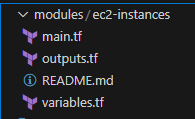
Modules take an organized approach, generally consisting of main.tf (resources), variables.tf (input variables), and outputs.tf (outputs). The organization makes collaboration easy, prevents code duplication, and promotes infrastructure consistency. With the utilization of modules, DevOps teams can build scalable and modular cloud architectures, enhancing efficiency in large-scale deployment.
2.1 Why Terraform Modules Matters
Terraform modules are vital in making infrastructure reusable, consistent, and more manageable. Rather than repeating the same Terraform code, teams can use modules to outline repeatable items such as VPCs, databases, and compute instances. It helps to be efficient and avoid duplication, thus making infrastructure modular and scalable.
Deploying with modules also encourages consistency throughout deployments by applying consistent configurations, limiting errors, and maintaining best practices compliance. Teamwork is also enhanced with collaboration as developers can develop high-quality, version-controlled modules and automate workflow across projects. With Terraform modules, teams get faster, more consistent, and easier-to-maintain infrastructure automation.
2.2 Key Benefits of Using Terraform Modules
Terraform modules offer several advantages that enhance infrastructure management and automation:
- Code Reuse – Modules allow teams to define infrastructure components once and reuse them across multiple projects, reducing duplication and improving efficiency.
- Simplified Management – By grouping related resources into modules, teams can manage complex infrastructure more easily, making deployments structured and scalable.
- Better Maintainability – Modular code makes it easier to update, troubleshoot, and extend configurations without affecting the entire infrastructure.
- Encapsulation of Resources – Modules encapsulate related resources, keeping Terraform configurations organized and preventing unnecessary exposure of internal components.
By leveraging Terraform modules, teams can build robust, reusable, and maintainable cloud architectures while improving collaboration and efficiency.
3. Anatomy of a Terraform Module
A Terraform module is structured to ensure clarity, reusability, and maintainability. Below are the key files that make up a module and their roles.
1. Main Configuration File (main.tf) – Defines Resources
The main.tf file is the core of a Terraform module, where you define the resources that Terraform will manage. This includes cloud services like virtual machines, storage buckets, databases, and networking components. Each resource follows a declarative syntax, specifying parameters like instance type, region, and security settings. Example Shown below.
resource "aws_instance" "web" {
  ami           = "ami-12345678"
  instance_type = "t2.micro"
}
This defines an AWS EC2 instance with a specific AMI ID and instance type.
2. Variables File (variables.tf) – Defines Input Variables
The variables.tf file allows users to define input variables, making the module more flexible and reusable. Instead of hardcoding values, input variables let you customize resources dynamically based on user-defined values. Example Shown below
variable "instance_type" {
  description = "Type of EC2 instance"
  type        = string
  default     = "t2.micro"
}
Now, instead of fixing the instance type in main.tf, users can pass different values when using the module.
3. Outputs File (outputs.tf) – Defines Outputs from the Module
The outputs.tf file defines what information the module should return after execution. This is useful when chaining modules together or when you need key resource details after deployment. Example given below
output "instance_public_ip" {
  description = "Public IP of the EC2 instance"
  value       = aws_instance.web.public_ip
}
Now, Terraform will display the public IP of the created instance after running terraform apply.
4. README.md – Documentation for Usage
The README.md file is crucial for documenting the module, explaining its purpose, inputs, outputs, and usage instructions. This helps other developers understand how to use the module effectively. Well-documented modules improve team collaboration and code reusability.
# AWS EC2 Module
This module deploys an EC2 instance on AWS.

## Inputs
- `instance_type`: The type of instance to deploy.

## Outputs
- `instance_public_ip`: The public IP address of the deployed EC2 instance.
5. Providers File (providers.tf) – Defines Cloud Provider Settings
The providers.tf file specifies the cloud provider Terraform will use. It defines the provider’s configuration settings, such as authentication credentials and regions.
provider "aws" {
  region = "us-east-1"
}
Above code tells Terraform to deploy resources in AWS’s us-east-1 region.
Through keeping Terraform code in these organized files, modules are still reusable, scalable, and maintainable. This method streamlines infrastructure management, diminishes errors, and makes sure that the deployments are performed according to the best practices. Below is the modules folder structure.
4. Creating a Basic Terraform Module
Terraform modules help organize and reuse infrastructure code. Below is a step-by-step guide to creating a simple EC2 instance module in Terraform.
Step 1: Define the Module (main.tf)
In the main.tf file, define the EC2 instance resource using Terraform. The AMI ID and instance type are referenced as variables, making the module flexible.
This configuration deploys an EC2 instance, allowing input values for the AMI and instance type.
resource "aws_instance" "web" {
  ami           = var.ami_id # getting value from variables.tf
  instance_type = var.instance_type # getting value from variables.tf
}
Step 2: Define Input Variables (variables.tf)
The variables.tf file defines input variables, allowing users to customize the instance settings.
variable "ami_id" {
  description = "AMI ID for the EC2 instance"
  type        = string
}

variable "instance_type" {
  description = "Instance type"
  type        = string
  default     = "t2.micro"
}
Now, when using this module, users can pass different AMI IDs and instance types as needed.
Step 3: Define Outputs (outputs.tf)
The outputs.tf file specifies what Terraform should return after deployment.
output "instance_id" {
  description = "ID of the created EC2 instance"
  value       = aws_instance.web.id
}
After running terraform apply, Terraform will display the ID of the newly created EC2 instance. This modular approach improves scalability, reusability, and maintainability of Terraform configurations
Let’s Summarize what we have just done. We started by defining the module in main.tf, where the aws_instance resource is configured with AMI ID and instance type as variables. Next, define input variables in variables.tf, allowing users to customize the instance settings, such as AMI ID and instance type, with defaults where needed. Finally, use outputs.tf to specify outputs like the EC2 instance ID, ensuring Terraform provides useful deployment information. This modular approach enhances reusability, scalability, and maintainability, making infrastructure management more efficient and flexible.
Now to use the EC2 instance module, first, call the module in the root Terraform configuration by specifying the source path and passing the required variables (ami_id and instance_type). This is done using the module block in main.tf. Next, initialize Terraform by running terraform init, which downloads necessary providers and modules. Finally, apply the configuration using terraform apply -auto-approve, which provisions the EC2 instance as defined in the module. This approach ensures modular, reusable, and scalable infrastructure while simplifying deployment with Terraform’s automation capabilities.
5. Advanced Terraform Module Features
5.1 Using Nested Modules
Terraform modules can invoke other modules, allowing for hierarchical and reusable infrastructure configuration. This is helpful when dealing with complex deployments, like provisioning a network (VPC) and compute (EC2 instances) independently while making sure they work well together. For instance, a VPC module can invoke a subnet module to provision subnets dynamically inside the VPC as shown below.
Example: A VPC Module Calling a Subnet Module
#Root Module (main.tf)

# Call the VPC module to create a Virtual Private Cloud (VPC)
module "vpc" {
  source     = "./modules/vpc"  # Path to the VPC module
  vpc_cidr   = "10.0.0.0/16"    # Define the CIDR block for the VPC
}

# Call the Subnet module to create a subnet inside the VPC
module "subnet" {
  source     = "./modules/subnet"  # Path to the Subnet module
  vpc_id     = module.vpc.vpc_id   # Reference the VPC ID from the VPC module
  cidr_block = "10.0.1.0/24"       # Define the CIDR block for the subnet
}
# VPC Module (modules/vpc/main.tf)

# Create a VPC
resource "aws_vpc" "main" {
  cidr_block = var.vpc_cidr  # Use the CIDR block provided as input
}

# Output VPC ID for other modules to use
output "vpc_id" {
  value = aws_vpc.main.id
}
#VPC Variables File (modules/vpc/variables.tf)

# Define a variable for the VPC CIDR block
variable "vpc_cidr" {
  description = "CIDR block for the VPC"
  type        = string
}
#Subnet Module (modules/subnet/main.tf)

# Create a subnet inside the specified VPC
resource "aws_subnet" "main" {
  vpc_id            = var.vpc_id      # Reference the VPC ID passed from the root module
  cidr_block        = var.cidr_block  # Define the CIDR block for the subnet
  map_public_ip_on_launch = true      # Enable public IP assignment for instances in this subnet
}

# Output Subnet ID for use in other modules
output "subnet_id" {
  value = aws_subnet.main.id
}
#Subnet Variables File (modules/subnet/variables.tf)

# Define a variable for the VPC ID
variable "vpc_id" {
  description = "ID of the VPC where the subnet will be created"
  type        = string
}

# Define a variable for the Subnet CIDR block
variable "cidr_block" {
  description = "CIDR block for the subnet"
  type        = string
}
Let’s now understand the working of above code
- The root module (
main.tf) calls the VPC module to create a new VPC with a specified CIDR block. - The VPC module (
modules/vpc/main.tf) defines and outputs the VPC ID so other modules can use it. - The root module then calls the Subnet module (
modules/subnet/main.tf) and passes the VPC ID from the VPC module to associate the subnet with the correct VPC. - The subnet module creates a subnet inside the VPC, ensuring a clean, modular, and reusable Terraform setup.
5.2 Using Remote Modules from Terraform Registry
Terraform allows users to leverage pre-built modules from the Terraform Registry, reducing development time and ensuring best practices. The Terraform Registry provides a vast collection of community and official modules for AWS, Azure, GCP, and other providers. Instead of writing infrastructure code from scratch, users can reuse and customize existing modules. For example, an AWS VPC module from the registry can be used to quickly provision a VPC with subnets, route tables, and security groups. Using public modules enhances productivity, ensures consistency, and simplifies infrastructure management.
Example: Using an AWS VPC Module from the Terraform Registry
terraform {
  required_providers {
    aws = {
      source  = "hashicorp/aws"
      version = "~> 5.0"
    }
  }
}

provider "aws" {
  region = "us-east-1"
}

# Using a publicly available AWS VPC module from Terraform Registry
module "vpc" {
  source  = "terraform-aws-modules/vpc/aws"  # Terraform Registry module
  version = "5.0.0"

  name            = "my-vpc"
  cidr           = "10.0.0.0/16"
  azs            = ["us-east-1a", "us-east-1b"]
  private_subnets = ["10.0.1.0/24", "10.0.2.0/24"]
  public_subnets  = ["10.0.3.0/24", "10.0.4.0/24"]

  enable_nat_gateway = true
  enable_vpn_gateway = true
}

output "vpc_id" {
  description = "ID of the created VPC"
  value       = module.vpc.vpc_id
}
Let’s de-code this code.
- The Terraform provider for AWS is defined and the region is set.
- The VPC module from the Terraform Registry (
terraform-aws-modules/vpc/aws) is used to create a VPC. - The module allows users to define private and public subnets, enable NAT and VPN gateways, and manage networking efficiently.
- The VPC ID is outputted for use in other modules or resources.
Using Terraform Registry modules helps accelerate development, improve maintainability, and enforce best practices in infrastructure provisioning.
5.3 Managing Module Versions
When working with Terraform modules, locking the version of the module is important to provide stability and avoid surprise changes when new versions are released. Without specifying a module version, Terraform will load the latest available version, which could cause breaking changes or unanticipated behavior. Specifying a version helps teams have consistency among various environments and upgrade modules safely when required. Terraform supports version constraints such as exact versions, ranges, or minimum versions with the version argument
Example: Locking a Terraform Module Version
terraform {
  required_providers {
    aws = {
      source  = "hashicorp/aws"
      version = "~> 5.0"
    }
  }
}

provider "aws" {
  region = "us-east-1"
}

# Using a locked module version for VPC from Terraform Registry
module "vpc" {
  source  = "terraform-aws-modules/vpc/aws"
  version = "5.0.0"  # Locks the module to version 5.0.0

  name            = "my-secure-vpc"
  cidr           = "10.0.0.0/16"
  azs            = ["us-east-1a", "us-east-1b"]
  private_subnets = ["10.0.1.0/24", "10.0.2.0/24"]
  public_subnets  = ["10.0.3.0/24", "10.0.4.0/24"]

  enable_nat_gateway = true
  enable_vpn_gateway = true
}

output "vpc_id" {
  description = "ID of the created VPC"
  value       = module.vpc.vpc_id
}
In the above code, Terraform Registry VPC module is used with a specific version (5.0.0), preventing Terraform from fetching the latest version automatically.
Using version locking in Terraform modules helps maintain stability, security, and consistency across deployments, making it a best practice in production environments.
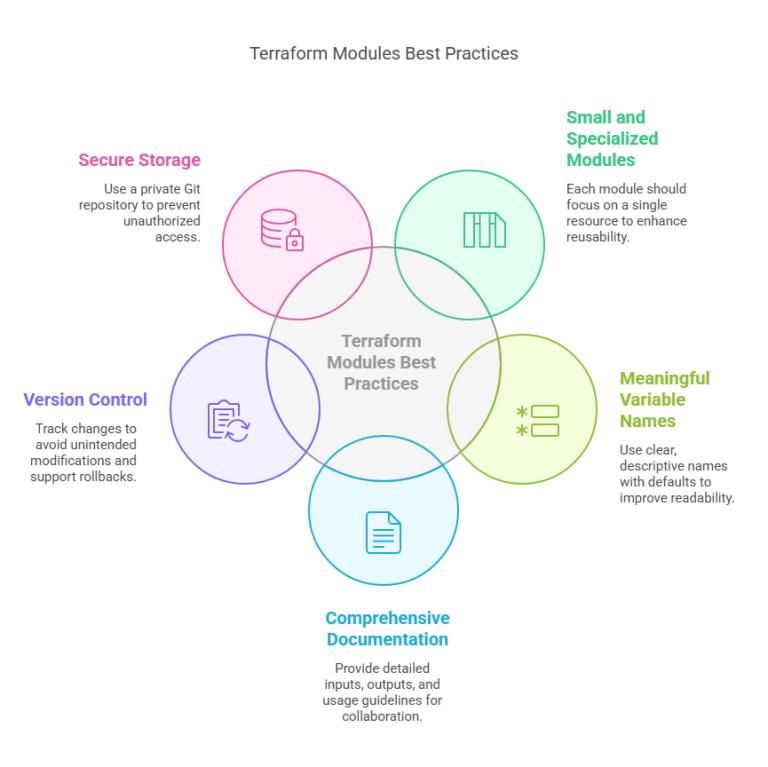
6. Best Practices for Terraform Modules
I have already posted a comprehensive blog on this subject, which explains everything in detail. I would strongly suggest reading it for a thorough understanding. It discusses important concepts, best practices, and step-by-step instructions to enable you to understand the subject in depth. Instead of going into depth here, you can read that blog for all the information here.
7. Debugging and Troubleshooting Terraform Modules
7.1 Debugging Module Errors and Missing Variables in Terraform
While using Terraform modules, missing variable or improper configuration errors are the norm. Terraform comes with inbuilt debugging features to detect and resolve such problems effectively. The initial step is to thoroughly review the module’s input variables and confirm that all the necessary values are declared in the variables.tf file. If a variable is not declared, Terraform will produce an error when run. Moreover, provision of default values to optional variables could avoid problems. Utilization of Terraform’s native logging (TF_LOG=DEBUG) might also be employed to follow module-related problems and comprehend where configuration is breaking.
7.2 Using Terraform Plan and Apply to Validate Configurations
Terraform offers the terraform plan command to preview changes to infrastructure prior to implementation. This prevents misconfigured modules, unset variables, or dependency issues from being noticed until deployment time. Executing terraform apply -auto-approve without verifying the plan can result in surprise failures. Moreover, running terraform validate guarantees proper configuration syntax. For instance, if a module lacks a needed variable, terraform plan will explicitly flag the problem. Always check the execution plan first before making any changes to make sure Terraform is reading the module’s configuration correctly.
7.3 Checking Terraform State for Module-Related Issues
Terraform stores infrastructure details in the state file (terraform.tfstate), which helps track module dependencies and configurations. If a module-related issue arises, inspecting the state file can reveal inconsistencies. Using the terraform state list command helps identify missing or incorrectly referenced resources within a module. Additionally, terraform state show <resource> provides details about the resource’s current state. If the issue is due to a corrupted state file, running terraform refresh or manually modifying the state file (with caution) can help resolve the problem. Keeping state files version-controlled and backed up ensures better debugging and recovery strategies.
8. Conclusion
Terraform modules are the foundation of scalable and sustainable infrastructure, allowing teams to repeat, structure, and standardize cloud installations. By dividing configurations into modular pieces, DevOps teams can simplify workflows, eliminate redundancy, and automate provisioning with ease. Whether you’re dealing with simple instances or sophisticated multi-cloud setups, modules promote efficiency and guarantee consistency in deployments. It is the ideal moment to begin creating reusable Terraform modules to streamline your infrastructure and push your DevOps journey to the next level. Want to push your skills to the next level? Jump in, test, and build your own powerful Terraform modules today!
Next Step
Now that you understand the power of Terraform modules, take the next step in your Infrastructure as Code (IaC) journey:
- Learn about Terraform Workspaces – Manage multiple environments (dev, staging, production) efficiently.
- Explore dynamic module configurations – Use Terraform locals to create flexible and reusable modules.
- Try Terraform Cloud for enterprise deployments – Leverage remote state management, policy enforcement, and collaboration features.
Keep experimenting, refining, and scaling your Terraform skills to build even more robust and automated cloud infrastructures!
We’d love to hear from you! Share your Terraform experiences, challenges, or insights in the comments, and let’s continue the conversation on mastering Infrastructure as Code.
Explore my other articles on DevOps and Cloud for more insights, tips, and tutorials. Stay informed and enhance your skills with practical content designed to boost your knowledge. Happy learning!