Terraform Best Practices for Enterprise Deployments (2025 Edition)
1. Introduction
In today’s cloud-driven world, Terraform has become the go-to Infrastructure as Code (IaC) tool for enterprises looking to manage infrastructure reliably, efficiently, and at scale. Its provider-agnostic nature and declarative syntax make it ideal for orchestrating complex, multi-cloud environments. But as organizations grow, so do the challenges—scaling Terraform across multiple teams, enforcing security and compliance standards, managing state and secrets, and maintaining a balance between collaboration and control all become critical concerns.
No matter if you’re dealing with dirty module sprawl, unreliable environments, or compliance scans, you’re not the only one. These are the facts of Terraform deployments at enterprise scale—and they demand more than simply clean code.
In this blog, we’ll explore battle-hardened best practices for implementing Terraform in large enterprises. From organizing codebases and remote state management, to role-based access and CI/CD readiness, this post is full of actionable tips you can implement right away.
If you’re ready to elevate your Terraform game from team-level scripts to enterprise-level automation, this is the guide you’ve been waiting for. Let’s begin.
2. Why Enterprises Need a Strategic Terraform Approach
In sophisticated cloud environments, automation, repeatability, and consistency aren’t nice-to-haves—they’re mission-critical. When infrastructure grows across several teams, regions, and environments, manual configurations and ad-hoc scripts become rapidly unmanageable and error-prone. This is where Infrastructure as Code (IaC) tools like Terraform excel—but only when applied with discipline and strategy.
Without standardized operations, organizations are vulnerable to configuration drift, where environments slowly diverge from each other, resulting in difficult-to-follow bugs, unwanted behavior, and critical security vulnerabilities. With manual modifications, these risks are increased and troubleshooting hell. By contrast, automated, versioned infrastructure makes each environment—dev, staging, production—predictable, testable, and consistent.
3. Best Practices for Enterprise Terraform Deployments
In order to run Terraform at scale, businesses require a good base of best practices—inclusive of code organization and state management all the way to security, teamwork, and automation. In what follows, we’re outlining each foundational practice in detail.
3.1 Use a Multi-Environment Architecture
In enterprise Terraform environments, keeping the separation of environments clear—e.g., development, staging, and production—is critical for release management, testing, and stability. This helps prevent the risk of unforeseen changes impacting mission-critical systems as well as enabling teams to verify infrastructure changes safely prior to promoting into production.
You can achieve this through Terraform workspaces or by keeping independent state files per environment based on your team needs and infrastructure complexity. One possible directory layout can be /environments/dev, /environments/staging, and /environments/prod, with environment-specific config and variables within each. Not only does this enhance modularity, but it is also easier for CI/CD integration, managing state, and auditing—preventing variations among environments while keeping flexibility where possible.
3.2 Modularize Your Codebase
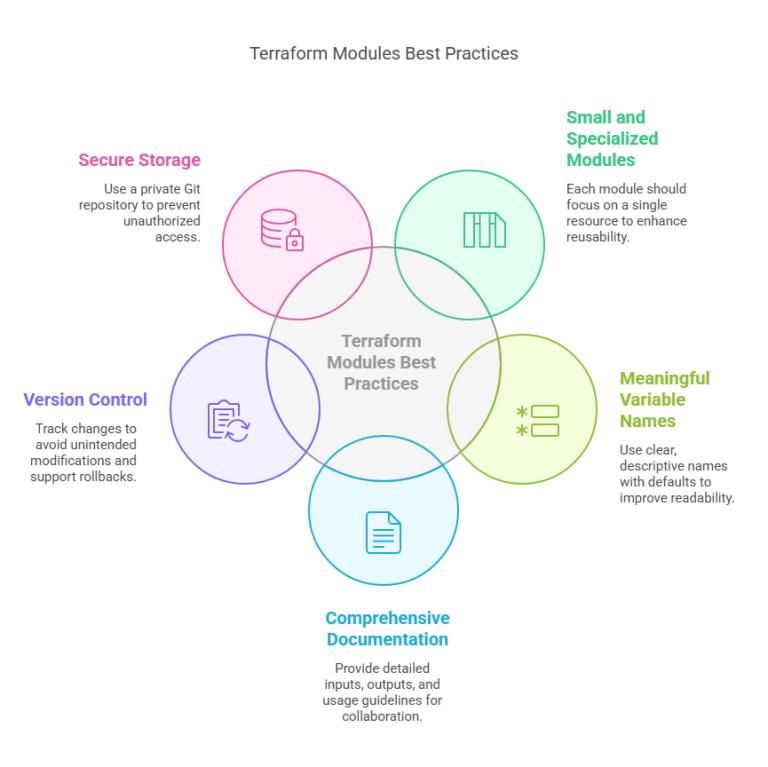
To keep Terraform configurations scalable and manageable in an enterprise environment, it’s important to modularize your code. This involves organizing your infrastructure code into reusable modules that adhere to the Single Responsibility Principle, such as having one module for creating VPC, another for EC2 instances, and so forth.
By dividing your infrastructure into logical, singular units, you enhance readability, minimize duplication, and facilitate easier updates. These modules must be versioned and kept in private Git repositories or published to an internal Terraform Registry, allowing teams to use stable, tested modules across multiple projects. Not only does this accelerate development, but it also imposes consistency and encourages best practices organization-wide.
3.3 Implement Remote State Management
In enterprise Terraform deployments, secure and centralized management of state is not optional. Rather than keeping state files on local machines—which can cause conflicts, data loss, or security vulnerabilities—use a remote backend such as AWS S3 with DynamoDB for state locking and consistency.
This configuration guarantees that only one user or automation pipeline can update infrastructure at a time, preventing race conditions and configuration drift. Also, enable encryption (with services such as AWS KMS) and versioning to secure sensitive information and permit rollback on failure. Remote state management not just streamlines team collaboration and auditability but also conforms to enterprise-level security and compliance requirements.
3.4 Enforce State Locking
In shared environments, state locking must be enforced to avoid multiple users or automation pipelines from making conflicting changes to the same Terraform state. Without locking, concurrent operations can corrupt the state file, resulting in unpredictable and potentially destructive behavior.
For AWS-backed environments, leveraging DynamoDB alongside S3 offers a robust locking mechanism. Alternatively, Terraform Cloud or Terraform Enterprise provides state locking and collaboration capabilities natively out of the box. State locking implementation guarantees secure, serialized access to your infrastructure state, dramatically lowering the chance of errors in enterprise-scale deployments.
3.5 Manage Secrets Securely
When working with infrastructure using Terraform, never hardcode credentials or secrets directly into your codebase. Keeping sensitive information in plain text in your configuration files is a security threat that can result in unauthorized access and breaches. Instead, use secure tools such as AWS Secrets Manager, HashiCorp Vault, or environment variables to store and load secrets dynamically.
Also, Terraform has a sensitive variable feature that flags variables as sensitive, which means they are encrypted within state files and not revealed in outputs. This is done to keep sensitive data secure, in compliance, and your organization free from possible vulnerabilities.
3.6 Adopt GitOps for Terraform Deployments
Embracing GitOps for Terraform deployments adds an extra layer of automation, version control, and transparency to your infrastructure management. Put your .tf files into a Git repository and have code reviews and approval workflows in place to ensure all changes go through rigorous vetting before being implemented. This creates a collaborative culture, traceability, and accountability, especially in big teams. In order to automate the Terraform process, implement CI/CD pipelines like GitHub Actions, GitLab CI, or Jenkins to process the terraform plan and terraform apply phases.
For example, a typical Terraform CI/CD pipeline might consist of the following stages:
- Validate the code
- Plan the changes
- Review and approve the plan
- Apply the changes once approved
This streamlined process minimizes human error, enforces best practices, and accelerates infrastructure updates in a controlled and secure manner.
3.7 Implement Role-Based Access Control (RBAC)
To provide security and governance in Terraform deployments, it is important to enforce Role-Based Access Control (RBAC), which restricts who can plan, apply, or manage state files. By having strict access controls, you can reduce the risk of accidental or unauthorized changes to your infrastructure. Utilize IAM roles, Terraform Cloud Teams, or Service Principals to enforce roles and assign permissions based on the principle of least privilege.
For example, only the authorized users must be able to make changes, while others can be limited to planning or viewing infrastructure. Also, audit access regularly to track who is making changes and to enforce internal policies. This multi-layered security model enhances accountability, reduces human error, and makes sure that only the correct people are engaging with critical infrastructure components.
3.8 Use Terraform Validate and Format
To keep Terraform configurations clean, readable, and free of errors, it’s necessary to enforce code style standardization between teams. Run terraform fmt to automatically style your Terraform code, using a consistent style and making collaboration easier for everyone. This is a simple step that removes arguments about code formatting and improves readability.
Furthermore, adding terraform validate to your CI pipeline ensures that syntax errors are caught early in the development cycle. By pre-validating your Terraform files automatically before they are deployed, you minimize errors and failures at deployment time. This forward-looking strategy simplifies collaboration, preserves high-quality code, and eliminates syntax issues before they become full-blown problems.
3.9 Version Control Everything (Except State Files)
In Terraform processes, it is critical to have every .tf file under Git version control to support version history, change tracking, and shared development. Having your configuration under version control makes it possible for teams to inspect, audit, and roll back infrastructure changes without fear.
You should never, however, commit sensitive and environment-specific files such as terraform.tfstate, backup files, or the .terraform/ directory. These are the files that usually hold credentials and latest infrastructure state, which would be very dangerous to save in Git because it holds severe security and merge conflict potential. Avoid this by using a .gitignore file to refuse them explicitly within your repositories.
This ensures your Git history remains clean, safe, and only holds code that defines your infrastructure, not the state that it creates.
3.10 Leverage Sentinel or Policy as Code Tools
To maintain control and compliance at scale, enterprises should leverage Policy as Code tools like Sentinel (for Terraform Enterprise), Open Policy Agent (OPA), or Conftest. These tools enable you to enforce guardrails that ensure infrastructure changes align with your organization’s policies—for example, restricting the creation of resources in non-approved regions or blocking instances that exceed defined cost thresholds.
By codifying governance rules, you can automatically validate changes before they are applied, reducing human error and maintaining compliance with internal and external regulations. Integrating these tools into your CI/CD pipeline helps create a secure, scalable, and auditable infrastructure environment that meets enterprise standards.
4. Conclusion
As we reach the end of this blog, let’s quickly recap all the key practices for a clear and concise understanding.
Enterprise-level Terraform deployments need more than provisioning infrastructure—they need a systematic, secure, and sustainable process. By embracing the best practices in this guide—from employing a multi-environment architecture and modularizing your codebase to using remote state management, role-based access control (RBAC), and policy-as-code tools—you establish a solid foundation for robust Infrastructure as Code (IaC) processes. These practices not only enhance scalability and collaboration but also security, compliance, and operational efficiency.
As companies scale, so does the complexity of cloud environment management. Focusing on automation, code modularity, and governance provides consistency within teams and across regions, lowers the risk of configuration drift, and eliminates human error. Another key change of mindset for teams is to deploy Terraform in the same manner as production code—test every modification, preserve version control, protect sensitive information, and establish code reviews. These practices shift Terraform from a basic provisioning tool to a mature, enterprise-grade framework.
Next Step
- Start by auditing your current Terraform workflows.
- Identify gaps in security, collaboration, or scalability. Then, create a roadmap to incrementally implement these best practices—beginning with remote state management and CI/CD integration.
- Finally, explore policy-as-code and secret management tools to bring your Terraform setup to an enterprise-grade level.
We’d love to hear from you! Share your Terraform experiences, challenges, or insights in the comments, and let’s continue the conversation on mastering Infrastructure as Code.
Explore my other articles on DevOps and Data for more insights, tips, and tutorials. Stay informed and enhance your skills with practical content designed to boost your knowledge. Happy learning!