AWS EC2 Pricing Explained: A Comprehensive Guide

1. Introduction
Regarding cloud computing, Amazon Web Services (AWS) leads the industry, with Elastic Compute Cloud (EC2) being one of its most potent and widely used services. However, understanding AWS EC2 Pricing Explained can be complex due to its flexible and multi-layered pricing models.
Whether you’re a startup, an enterprise, or an individual exploring the cloud, mastering EC2 pricing is essential to optimize costs while maximizing AWS’s capabilities.
In this detailed guide, we’ll break down everything about AWS EC2 Pricing Explained, covering instance types and pricing models like On-Demand, Reserved, and Spot Instances. By the end, you’ll be equipped to navigate EC2 pricing smartly, make cost-efficient decisions, and get the best value for your investment. So let’s start our journey.
2. Amazon Web Services EC2
Amazon EC2 (Elastic Compute Cloud) is a primary service of Amazon Web Services (AWS) that delivers scalable, on-demand computing capability. Users can lease virtual servers, or instances, to execute applications and workloads on the cloud. EC2 provides a variety of instance types with differing CPU, memory, and storage configurations, making it versatile for multiple use cases—ranging from web hosting to machine learning. With EC2, customers can scale up or down their infrastructure as needed and only pay for the resources they consume, offering flexibility, cost savings, and high-performance reliability for companies of all sizes.
2.1 Importance of understanding EC2 pricing
Managing AWS costs effectively starts with understanding EC2 pricing models. Without this knowledge, businesses may overspend or miss out on cost-saving opportunities. Here’s why it’s essential:
- Multiple Pricing Models – EC2 offers On-Demand, Reserved Instances, Spot Instances, and Savings Plans, each catering to different needs. Choosing the right one can significantly impact costs.
- Cost Optimization – On-Demand instances offer flexibility but are expensive for long-term use. Reserved Instances provide up to 75% savings but require a long-term commitment. Spot Instances are the cheapest but can be interrupted anytime.
- Workload Suitability – Understanding your workload patterns helps in selecting the best pricing model. For example, mission-critical applications benefit from Reserved Instances, while batch jobs can take advantage of Spot Instances.
- Avoiding Unnecessary Expenses – Not monitoring instance usage can lead to paying for idle resources. Using AWS Cost Explorer and Trusted Advisor can help identify cost-saving opportunities.
- Balancing Performance and Budget – Selecting the right EC2 pricing model ensures you get the best performance at the lowest possible cost, making your AWS investment more efficient.
Mastering EC2 pricing enables businesses to optimize cloud costs and enhance operational efficiency in AWS. Now, let’s take a quick look at the different EC2 instance types.
2.2 Types of EC2 Instances
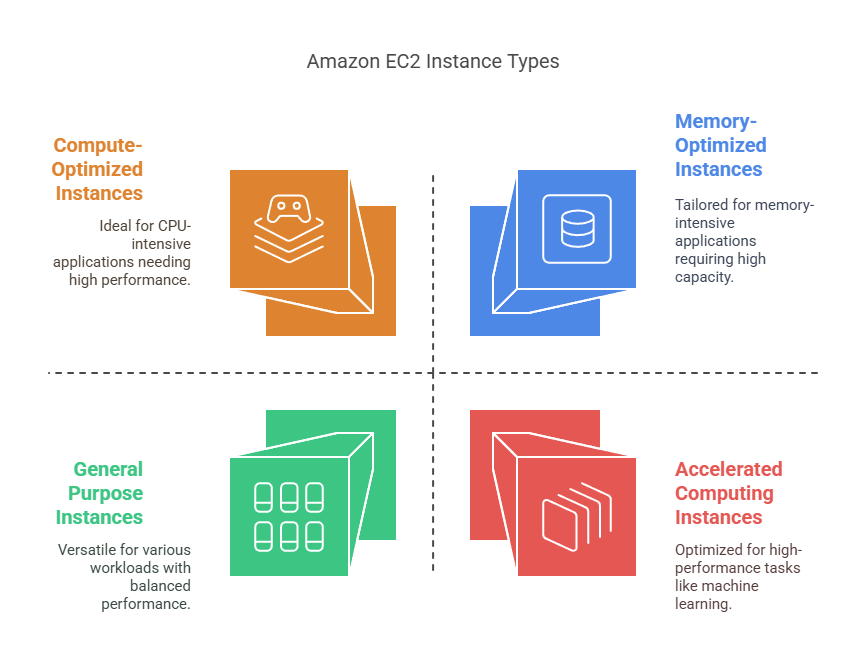
Amazon EC2 provides different instance types to support various workloads. Choosing the right instance type is crucial for achieving optimal performance and cost efficiency. Here are the main categories:
- General Purpose Instances – Balanced CPU, memory, and networking performance. Ideal for web servers, development environments, and small databases. Examples: t3, m5, m6i.
- Compute-Optimized Instances – High CPU performance for compute-intensive applications like gaming, media processing, and scientific modeling. Examples: c5, c6g, c7i.
- Memory-Optimized Instances – Designed for applications that require high memory capacity, such as in-memory databases and big data analytics. Examples: r5, x2idn, z1d.
- Storage-Optimized Instances – Best for workloads requiring high read/write speeds and large storage, like big data, high-performance databases, and analytics. Examples: i3, d2, h1.
- Accelerated Computing Instances – Equipped with GPUs and FPGAs for tasks like machine learning, deep learning, and high-performance computing. Examples: p4, g5, inf2.
You might wonder why understanding EC2 instances is important. Here are key reasons that answer this question:
- Selecting the wrong instance type can lead to overpaying for resources or underperformance.
- Matching the instance type with workload needs ensures efficiency and cost savings.
- AWS provides instance families tailored for specific workloads, making it easier to optimize cloud infrastructure.
2.3 AWS EC2 Pricing Models
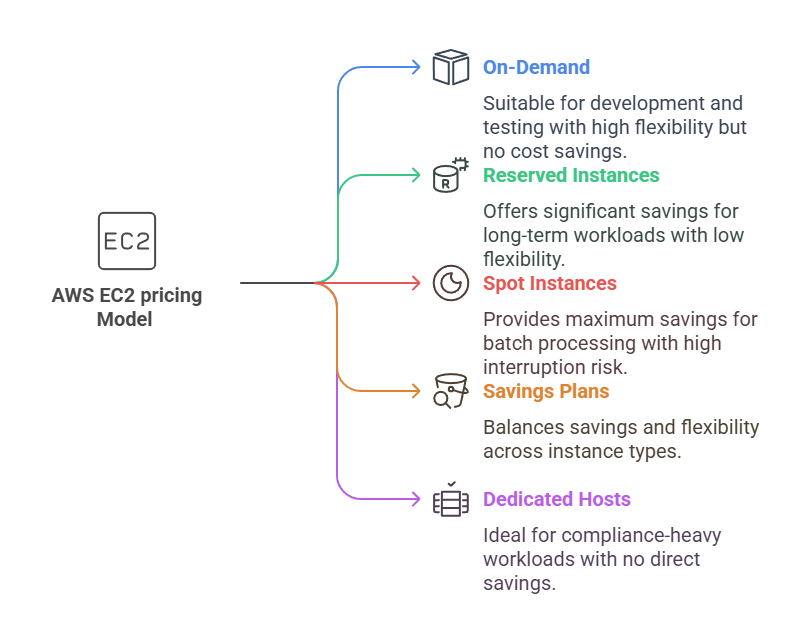
EC2 pricing models are segmented into various options depending on the usage requirements and cost-effectiveness. These include On-Demand, Reserved, Spot, and Savings Plans. Each of them has its own advantages, which enable users to maximize costs and achieve their workload-specific requirements. Let’s learn more about these pricing models in detail.
- On-Demand Instances
This allow users to pay for compute capacity on a per-second or per-hour basis with no upfront cost or long-term commitment. This model provides maximum flexibility, making it ideal for applications with unpredictable workloads or short-term projects. Businesses can scale resources up or down based on demand, ensuring they only pay for what they use. However, On-Demand pricing is the most expensive option in the long run compared to other models, making it less cost-effective for continuous workloads. It’s best suited for development, testing, and applications with variable traffic patterns. - Reserved Instances (RIs)
This offers significant cost savings (up to 75% off On-Demand pricing) in exchange for a 1- or 3-year commitment. They are best suited for steady-state workloads where the instance usage is predictable and consistent over time. AWS provides three payment options: All Upfront, Partial Upfront, and No Upfront, with greater savings for upfront payments. RIs are region-specific, but Convertible RIs allow instance type flexibility. This model is ideal for enterprise applications, databases, and workloads running 24/7 that do not require frequent instance type changes. - Spot Instances
This offer massive discounts (up to 90% off On-Demand prices) by allowing users to bid on unused EC2 capacity. They are ideal for workloads that are fault-tolerant and can handle interruptions, as AWS can reclaim the instance at any time if capacity is needed elsewhere. Common use cases include big data processing, high-performance computing (HPC), machine learning, and CI/CD pipelines. While they provide exceptional cost savings, they are not suitable for critical applications that require guaranteed uptime. Businesses can use Spot Fleet to manage multiple Spot Instances and reduce disruption risks. - Savings Plans
It provide flexibility and cost savings similar to Reserved Instances but without instance type or region restrictions. Users commit to a consistent usage level (measured in $/hour) for 1 or 3 years, receiving discounts of up to 72% compared to On-Demand pricing. Unlike RIs, Savings Plans automatically apply across different EC2 instance types, regions, and operating systems, offering more adaptability. They are best suited for organizations with changing workloads that need long-term cost savings while maintaining flexibility. Savings Plans come in two types: Compute Savings Plans (covering EC2, Lambda, and Fargate) and EC2 Instance Savings Plans (specific to EC2 families in a region). - Dedicated Hosts
Dedicated Hosts provide a physical EC2 server fully dedicated to a single customer, offering complete hardware isolation and control. This model is ideal for workloads requiring compliance with regulations, software licensing restrictions, or enhanced security. Users can place multiple VMs on a Dedicated Host, allowing for better utilization of resources while maintaining control over the hardware. It supports bring-your-own-license (BYOL) scenarios for software that requires per-core or per-socket licensing, such as Microsoft and Oracle products. Dedicated Hosts are best for financial services, healthcare, and government organizations that require strict compliance and security policies. - Dedicated Instances
Dedicated Instances run on single-tenant physical servers, providing isolation from other AWS customers but without the additional control and visibility of Dedicated Hosts. They are priced per instance rather than per host, making them a more cost-effective option for workloads that require physical isolation but don’t need full hardware control. Unlike Dedicated Hosts, Dedicated Instances do not allow specific host-level control, making them less flexible for licensing requirements. They are best suited for organizations needing enhanced security for sensitive data while still benefiting from the AWS cloud environment.
3. EC2 Pricing Models & Instance Families Comparison
Selecting the right EC2 pricing model and instance family is crucial for optimizing costs and ensuring the best performance for your workloads. Different pricing models offer varying levels of cost savings, flexibility, and commitment, while instance families cater to specific compute, memory, storage, and GPU needs. Understanding the relationship between pricing options and instance types helps businesses maximize efficiency and minimize expenses.
The table below provides a detailed comparison to help you make an informed decision.
| Pricing Model | Cost Savings | Commitment Required | Flexibility | Risk of Interruption | Best For | Instance Family | Use Case Suitability | Cost Considerations | Example Instance Types |
|---|---|---|---|---|---|---|---|---|---|
| On-Demand | No discount (highest cost) | No | High | No | Development, testing, variable workloads | General Purpose | Balanced CPU, memory, and networking | Moderate cost, cost-efficient | t3, m5, m6i |
| Reserved Instances (RIs) | Up to 75% savings | Yes (1 or 3 years) | Low (Convertible RIs offer some flexibility) | No | Databases, enterprise apps, long-term workloads | Memory-Optimized | Applications needing high RAM (databases, caching) | High due to large memory needs | r5, x2idn, z1d |
| Spot Instances | Up to 90% savings | No | High | Yes (can be interrupted anytime) | Batch processing, big data, CI/CD, ML | Compute-Optimized | High-performance computing tasks (CPU-heavy) | Higher due to enhanced CPU power | c5, c6g, c7i |
| Savings Plans | Up to 72% savings | Yes (1 or 3 years) | Medium (flexible across instance types) | No | Workloads requiring cost savings with some flexibility | Storage-Optimized | Workloads needing high read/write | Cost varies (SSD vs HDD) | i3, d2, h1 |
| Dedicated Hosts | No direct savings (but licensing optimized) | Yes (1 or 3 years) | Low (fully dedicated hardware) | No | Compliance-heavy, software licensing workloads | Dedicated Instances | Applications needing tenant isolation | Medium (lacks host-level control) | Custom AWS configurations |
| Dedicated Instances | No direct savings (but dedicated hardware) | No | Medium (some flexibility) | No | Security-sensitive workloads requiring physical isolation | Accelerated Computing | GPU & FPGA workloads (AI, ML, HPC) | Expensive due to GPU/FPGA resources | p4, g5, inf2 |
4. Factors Affecting EC2 Pricing
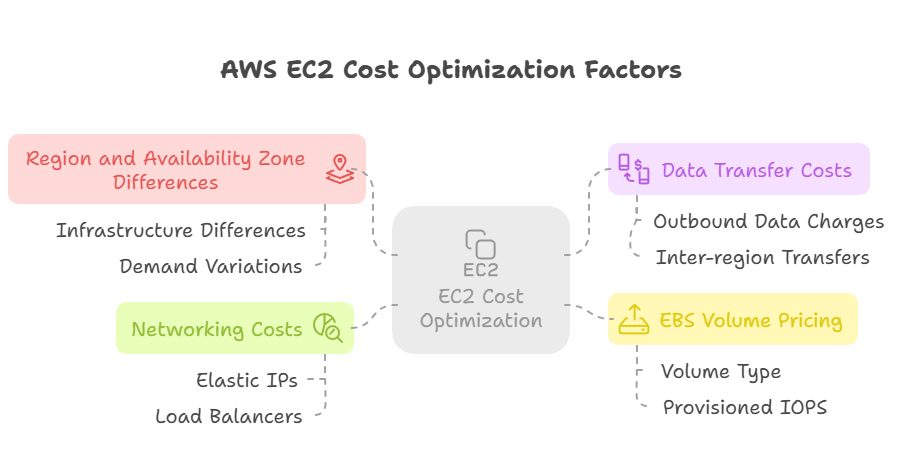
EC2 pricing is influenced by multiple factors beyond just the instance type and duration of usage. Understanding these factors helps optimize costs and avoid unexpected charges.
- Region and Availability Zone Differences
EC2 pricing varies across AWS regions and availability zones due to differences in infrastructure, demand, and operational costs. Regions with higher availability and competition, such as US East (N. Virginia), often have lower costs compared to less common regions like South America or Asia Pacific. Selecting a cost-effective region can significantly reduce expenses while ensuring performance needs are met. - Data Transfer Costs
AWS charges for data transferred out of EC2 instances to the internet or between regions. While inbound data transfer is free, outbound data transfer can add significant costs, especially for high-traffic applications. Inter-region transfers between AWS services also incur charges, making it crucial to minimize unnecessary cross-region communication to keep expenses low. - EBS Volume Pricing Impact on EC2 Costs
Amazon Elastic Block Store (EBS) provides storage for EC2 instances, but its pricing structure affects overall EC2 costs. EBS pricing depends on volume type (SSD vs. HDD), provisioned size, IOPS, and snapshots. For example, provisioned IOPS SSDs (io1/io2) cost more than standard SSDs (gp3/gp2). Choosing the right EBS volume type based on performance needs prevents excessive storage costs. - Networking Costs (Elastic IPs, Load Balancers, etc.)
EC2 networking-related services, such as Elastic IP addresses, NAT Gateways, and Load Balancers, contribute to overall costs. AWS charges for idle Elastic IPs, data processing in Elastic Load Balancers (ELBs), and NAT Gateway usage, making network architecture optimization essential for cost savings. Using Auto Scaling and efficient routing can reduce unnecessary network expenses.
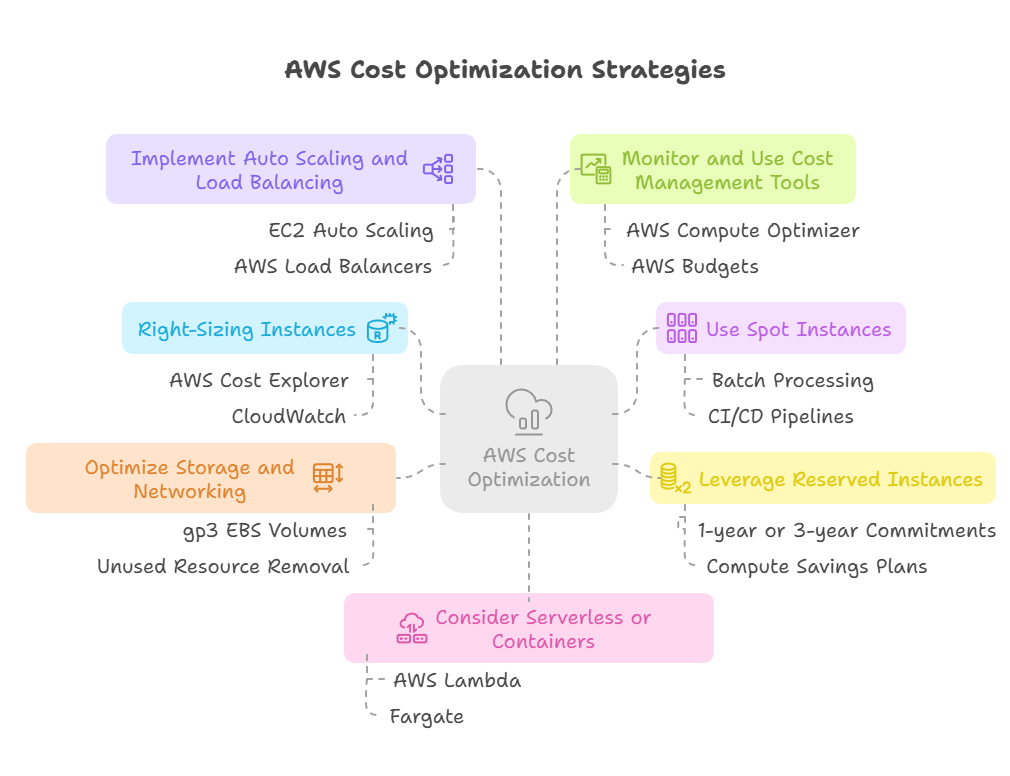
5. EC2 Cost Optimization Strategies
To optimize AWS EC2 costs without compromising performance, here are some effective strategies to help you save while ensuring smooth operations.
- Right-Sizing Instances
- Regularly analyze instance utilization using AWS Cost Explorer and CloudWatch.
- Choose the correct instance family and size based on CPU, memory, and network usage.
- Use EC2 Auto Scaling to dynamically adjust resources based on demand.
- Use Spot Instances for Flexible Workloads
- Spot Instances offer up to 90% cost savings compared to On-Demand pricing.
- Best suited for batch processing, CI/CD pipelines, big data, and machine learning.
- Use Spot Fleet and Auto Scaling Groups to manage interruptions efficiently.
- Leverage Reserved Instances & Savings Plans
- Commit to 1-year or 3-year Reserved Instances (RIs) for predictable workloads.
- Use Compute Savings Plans for flexibility across instance types and regions.
- Convert Standard RIs to Convertible RIs for better adaptability.
- Optimize Storage and Networking Costs
- Use gp3 EBS volumes instead of gp2 to lower storage costs.
- Monitor and remove unused Elastic IPs, Load Balancers, and NAT Gateways.
- Minimize inter-region data transfers to avoid high bandwidth costs.
- Implement Auto Scaling and Load Balancing
- Use EC2 Auto Scaling to automatically scale resources up or down.
- Deploy AWS Load Balancers (ALB, NLB) to distribute traffic efficiently.
- Reduce idle instances by setting Auto Scaling Group scaling policies.
- Monitor and Use Cost Management Tools
- Enable AWS Compute Optimizer for right-sizing recommendations.
- Set up AWS Budgets and Cost Anomaly Detection to track expenses.
- Use AWS Trusted Advisor for best practice recommendations.
- Consider Serverless or Container-Based Solutions
- Migrate workloads to AWS Lambda or Fargate to reduce EC2 dependency.
- Use Amazon ECS or EKS for containerized applications instead of running EC2-based Kubernetes clusters.
Conclusion
Understanding EC2 pricing models is essential for optimizing cloud costs and selecting the best instance type for your workload. AWS offers multiple pricing options, including On-Demand for flexibility, Reserved Instances and Savings Plans for long-term savings, Spot Instances for cost-efficient fault-tolerant workloads, and Dedicated Hosts/Instances for compliance-heavy applications. Choosing the right model can significantly impact your AWS spending.
To optimize EC2 costs, businesses should right-size instances, leverage Spot Instances for temporary workloads, and use Auto Scaling to dynamically adjust resources. Reserved Instances and Savings Plans help save costs on predictable workloads, while storage and networking optimizations further reduce expenses. Monitoring tools like AWS Cost Explorer, Compute Optimizer, and Trusted Advisor can provide actionable insights to fine-tune resource allocation.
For cost-efficient cloud usage, organizations should regularly review usage patterns, eliminate unused resources, and balance performance with cost-effectiveness. Combining multiple pricing models based on workload needs ensures scalability and savings. By following best practices, businesses can maximize efficiency, control expenses, and enhance cloud sustainability.
What’s Next
Develop a smart EC2 pricing strategy to optimize performance while keeping costs in check. This approach will make cloud computing both efficient and cost-effective!
💬 Get involved in the discussion! If you have questions or want to share your experience with AWS Services, drop a comment below. Your insights can help others and spark meaningful conversations in the community. Let’s learn and grow together!
Explore my other articles on DevOps and Cloud for more insights, tips, and tutorials. Stay informed and enhance your skills with practical content designed to boost your knowledge. Happy learning!