1. Introduction
Terraform modules are the backbones of IaC as they help to organize, reuse, and effectively manage cloud resources. They achieve consistency and automate infrastructure deployments by making them scale and maintain more easily.
Yet, to actually harness the powers of modules at their best, best practices in structuring modules, version controlling, and other security considerations come into play; otherwise, it would be efficient, reusable, and easy to collaborate on modules.
In this blog, we will discuss some of the top best practices, such as modular design principles, version locking, input validation, error handling, and security enhancements, to help you build solid and production-worthy Terraform modules.
2. Best Practices for Terraform Modules
Let’s jump into the best practices of Terraform modules to prevent you from making expensive errors. Adhering to these practices guarantees improved infrastructure management, enhances efficiency, and improves security. Misconfigurations can cause performance problems or unbudgeted costs, so it’s essential to know these best practices. Applying them will optimize your Terraform process, ensure uniformity, and avoid mistakes that could lead to excessive penalties. Let’s discuss these major strategies to make your infrastructure automation more efficient and cost-effective.
2.1 Keep Modules Small and Focused (Single Responsibility Principle)
A modular solution in Terraform assists in decomposing intricate infrastructure into reduced, reusable parts, which simplifies management, scaling, and debugging. Rather than declaring all resources in one file, you can write different modules for networking, compute, and storage to maintain consistency and avoid duplication.
Let’s understand it with example
Example: Modular VPC and EC2 Deployment
Rather than defining both a VPC and an EC2 instance in a single file, you can separate them into distinct modules for better organization and reusability like we done below.
#VPC Module (vpc/main.tf)
resource "aws_vpc" "main" {
  cidr_block = "10.0.0.0/16"
}
# EC2 Module (ec2/main.tf)
resource "aws_instance" "web" {
  ami           = var.ami_id
  instance_type = var.instance_type
  subnet_id     = module.vpc.subnet_id
}
#Root Module (main.tf)
module "vpc" {
  source = "./modules/vpc"
}

module "ec2" {
  source      = "./modules/ec2"
  ami_id      = "ami-123456"
  instance_type = "t3.micro"
}
Now let’s discuss some key points of Single Responsibility Principle
- Easier to debug and test
- Improves code readability.
- Encourages reuse across projects.
2.2 Use Descriptive Variable Names & Set Default Values
2.2.1 Why Clear and Descriptive Variable Names Improve Code Clarity
Employing descriptive and clear variable names in Terraform enhances readability, maintainability, and collaboration. Vague variable names make it hard to determine their function, and thus errors and confusion are created. Descriptive names enable developers to comprehend the function of each variable without having to look at documentation or comments.
Example: Poor vs. Clear Variable Naming
#poor Naming
variable "v1" {
  type        = string
  description = "The ID"
}
#clear Naming
variable "ami_id" {
  type        = string
  description = "Amazon Machine Image (AMI) ID for the EC2 instance"
}
In the poor example above, “v1” does not tell us anything about what the variable does. The good example, however, clearly indicates that it is an AMI ID for an EC2 instance.
Benefits of Clear Variable Names
- Improves Readability – Developers can quickly understand what each variable represents.
- Enhances Maintainability – Future updates are easier with self-explanatory variables.
- Prevents Errors – Reduces misinterpretation, leading to fewer deployment mistakes.
- Boosts Collaboration – Teams can work efficiently without needing extra explanations.
By adopting descriptive variable naming conventions, Terraform configurations become more structured, easier to debug, and scalable for long-term use.
2.2.2 How Default Values Streamline Usage and Reduce Input Needs
Using default values in Terraform variables streamlines configurations by eliminating the need for manual inputs. This ensures a smoother user experience while reducing errors. When a variable has a default value, Terraform will use it unless explicitly overridden, making the code more flexible and reusable.
Example: Using Default Values in Variables
variable "instance_type" {
  type        = string
  description = "EC2 instance type"
  default     = "t2.micro" #default value
}
In this example, Terraform automatically sets the instance type to “t2.micro” unless a different value is specified.
Benefits of Default Values
- Simplifies Configurations – Users don’t need to specify every variable manually.
- Prevents Errors – Reduces missing variable errors in deployments.
- Enhances Reusability – Works well across multiple environments with minimal changes.
- Improves Automation – Useful in CI/CD pipelines where fewer manual inputs are ideal.
By using default values, Terraform modules become more user-friendly, adaptable, and efficient, making infrastructure management hassle-free.
2.2.3 Using Terraform Description Attributes to Improve Clarity
Including description attributes for Terraform variables improves code readability and maintainability. It allows users to better comprehend the use of each variable, making team collaboration and infrastructure management simpler. Descriptions are inline documentation, minimizing confusion and promoting consistent usage.
Example: Adding Descriptions to Variables
variable "instance_type" {
  type        = string
  description = "Specifies the type of EC2 instance to deploy (e.g., t2.micro, t3.medium)"
  default     = "t2.micro"
}
In this example, the description clearly explains what the variable does and provides examples for users.
Benefits of Using Descriptions
- Enhances Readability – Users can quickly understand variable purposes.
- Aids Collaboration – Team members can work more efficiently with well-documented variables.
- Reduces Misconfigurations – Clear descriptions help avoid incorrect values.
- Improves Automation – Tools like Terraform Cloud and CI/CD pipelines benefit from structured documentation.
By leveraging description attributes, Terraform configurations become self-explanatory, ensuring better usability and maintainability across projects
2.3 Document the Module with a README and Usage Guide
2.3.1 Essential Documentation for Better Team Collaboration & Module Usability
Good documentation is necessary for successful team collaboration and keeps Terraform modules simple to use, easy to comprehend, and easy to manage. Without proper documentation, team members might find it difficult to understand how a module functions, resulting in misconfigurations, delays, and ineffective infrastructure management.
Modules should be well-documented with a README.md file that describes module usage, inputs needed, outputs, and sample configurations. For example:
# EC2 Instance Module
This module deploys an AWS EC2 instance with the specified configuration.

## Usage
```hcl
module "ec2_instance" {
  source        = "./modules/ec2-instance"
  instance_type = "t2.micro"
  ami_id        = "ami-123456"
}
By maintaining clear and structured documentation, teams can maximize productivity, prevent errors, and scale their infrastructure efficiently.
2.3.2 Essential Sections in a Module’s README.md
A well-structured README.md is crucial for understanding and using a Terraform module efficiently. It provides clear instructions, reducing confusion and improving collaboration. Below are the essential sections every module README should include:
- Module Overview – Briefly describe the module’s purpose and what resources it manages.
- Usage Example – Provide a sample configuration to help users implement the module quickly.
- Input Variables – List all configurable variables with descriptions, types, and default values.
- Outputs – Explain the outputs users can expect after applying the module.
- Requirements – Specify Terraform version compatibility and necessary provider plugins.
- Authors & License – Mention contributors and licensing details.
2.4 Use Version Control to Track Module Changes
Versioning Terraform modules is essential for ensuring stability and predictability in infrastructure deployments. Without version control, unanticipated updates in a module can introduce breaking changes, resulting in disruptions. Through the use of Git for change tracking, teams are able to have a history of updates, work efficiently, and roll back to earlier versions as necessary. Versioning helps ensure that infrastructure is consistent across environments, minimizing risks related to repeated module updates.
For example, tagging a module version in Git allows teams to mark stable releases:
git tag -a v1.0 -m "Initial version of the EC2 module"
git push origin v1.0
This creates a fixed reference for future use, preventing accidental modifications.
2.5 Secure & Accessible: Benefits of Storing Modules in a Private Git Repository
2.5.1 Why keeping modules in a private Git repository improves security and accessibility.
Terraform modules stored in a private Git repository improve security and convenience by limiting access to the right users while maintaining centralized control over infrastructure code. Private Git repositories, unlike public ones, block unauthorized changes and secure sensitive infrastructure configurations. Organizations can impose access controls, branch protections, and audit logs to track changes effectively.
With a private repository, module distribution between teams is also made easier. Developers can simply refer to private modules in their Terraform files. This ensures that all environments use approved and secure versions of the module, maintaining consistency and compliance while reducing security risks.
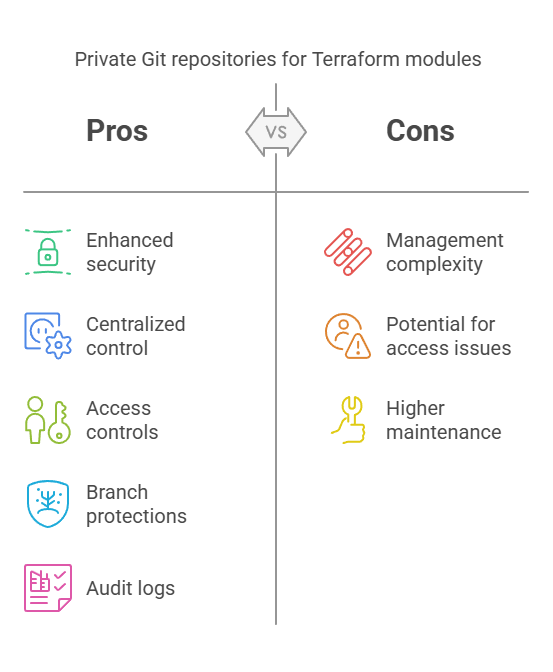
2.5.2 Managing Terraform Modules with GitHub, GitLab, or Bitbucket
Utilizing GitHub, GitLab, or Bitbucket for Terraform module management provides version control, collaboration, and security. These tools enable teams to store, track, and update Terraform modules effectively while having a transparent history of changes. In order to avoid unauthorized changes, organizations can enforce access controls with repository permissions, branch protection rules, and audit logs.
For instance, in GitHub, you can mandate branch protection by insisting on review of pull requests prior to merging changes. You can refer to a module contained in a private Git repository like this:
module "compute" {
  source  = "git::ssh://git@github.com/org/terraform-modules.git//ec2"
  version = "2.0.1"
}
This approach ensures secure, structured, and reliable Terraform module management across teams.
3. Conclusion
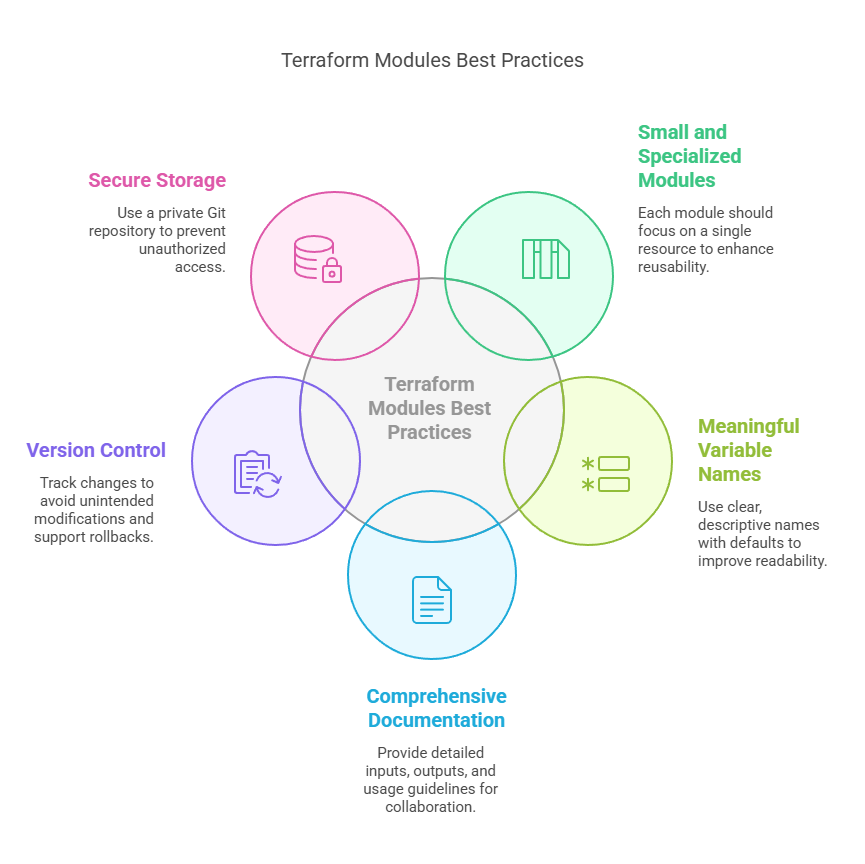
Terraform modules are critical for scalable, maintainable, and reusable infrastructure. To make them most effective, adhere to these best practices:
- Modules should be small and specialized – Make each module responsible for a single resource or associated resources for enhanced reusability.
- Meaningful variable names with defaults – Enhances readability and makes it easier to use modules.
- Properly document modules (README.md) – Give explicit inputs, outputs, and usage guidelines for enhanced team collaboration
- Use version control to track changes – Keep a history of changes, avoid unintended changes, and support rollbacks
- Store modules in a private Git repository – Lock down unauthorized access and provide consistency in deployments.
Next Step
Now that you know the best practices for Terraform modules, it’s time to level up your Terraform skills.
- Master How to Organize Terraform Projects Effectively – Proper organization of Terraform files guarantees maintainability and scalability. Discover various project structures and directory layouts to efficiently manage complex infrastructures.
- Discover Terraform Workspaces for Managing Multiple Environments – Workspaces enable you to manage multiple environments (e.g., dev, staging, and prod) in one Terraform configuration. It makes it easy to manage environments and avoid duplication.
- Experiment with CI/CD Automation with Terraform Cloud – Automate infrastructure deployment with Terraform integrated with GitHub Actions, GitLab CI/CD, or Jenkins. Terraform Cloud gives you built-in remote execution, state management, and policy enforcement for efficient workflows.
With the mastering of these steps next, you’ll take your DevOps automation and infrastructure as code (IaC) game even further. Get experimenting immediately and create an end-to-end automated, elastic, and secure cloud infrastructure using Terraform!
We’d love to hear from you! Share your Terraform experiences, challenges, or insights in the comments, and let’s continue the conversation on mastering Infrastructure as Code.
Explore my other articles on DevOps and Cloud for more insights, tips, and tutorials. Stay informed and enhance your skills with practical content designed to boost your knowledge. Happy learning!