7 Powerful Reasons Terraform Is a Game-Changer for DevOps Engineers in 2025
1. Introduction
Infrastructure as Code (IaC) is a DevOps practice that provisions and manages infrastructure through code rather than manual intervention. With IaC, configuration files create servers, networks, and other infrastructure elements, providing consistency, scalability, and repeatability across environments. This eliminates configuration drift, minimizes human errors, and accelerates deployments. IaC is necessary in contemporary cloud and DevOps pipelines, making it possible to manage infrastructure easily with tools such as Terraform, Ansible, and CloudFormation. Tackling infrastructure as code makes organizations deploy much faster, better collaborate, and have more reliable infrastructure, rendering IaC a core DevOps practice of today. This article will primarily focus on Terraform.
In spite of the emergence of new Infrastructure as Code (IaC) tools, Terraform remains a top option in 2025 because of its flexibility, scalability, and robust multi-cloud support. Its declarative nature, state management, and modular design ensure infrastructure provisioning is effortless and trustworthy. Terraform’s large ecosystem, with hundreds of providers, enables teams to provision resources across AWS, Azure, Google Cloud, Kubernetes, and on-premises environments. In addition, its inclusion in CI/CD pipelines, security policies, and automation frameworks maintains its position among leading DevOps practices. Due to continuous improvement and a healthy community, Terraform is a go-to solution for modern infrastructure automation.
In 2025, Terraform remains a game-changer for DevOps engineers, providing unmatched capabilities for infrastructure automation, multi-cloud management, and scalability. This blog will explore seven powerful reasons why Terraform continues to be a top choice, covering its declarative approach, state management, modularity, and integration with CI/CD pipelines. You’ll learn how Terraform enhances efficiency, security, and collaboration in modern DevOps workflows. Whether you’re new to Terraform or looking to refine your skills, this guide will help you understand why Terraform remains essential for managing infrastructure in 2025 and beyond. Stay tuned to discover its full potential
2. What is Terraform?
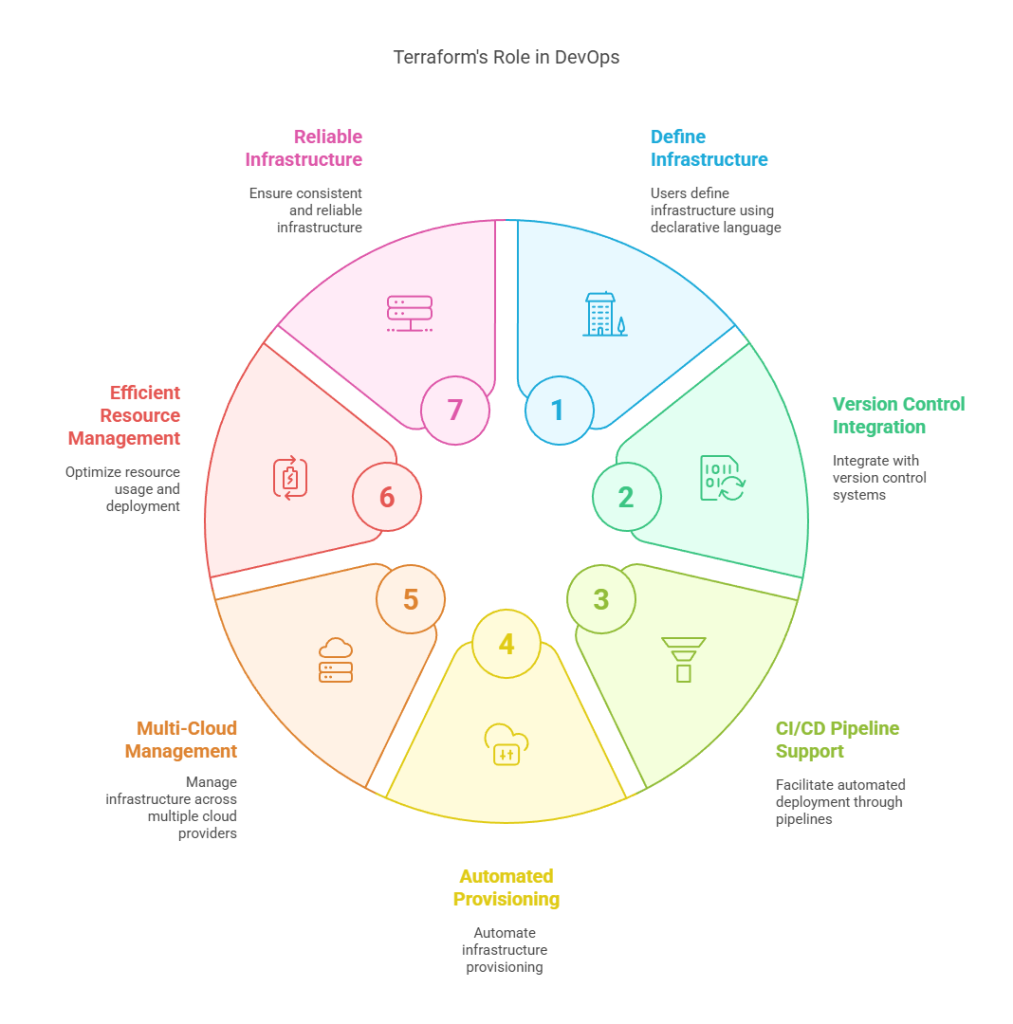
Terraform is an open-source Infrastructure as Code (IaC) tool developed by HashiCorp that allows DevOps teams to provision, manage, and automate infrastructure across multiple cloud providers. Using a declarative language, Terraform enables users to define infrastructure as code, ensuring consistent, repeatable, and scalable deployments. It integrates seamlessly into DevOps workflows by supporting version control, CI/CD pipelines, and automated infrastructure provisioning. Terraform’s provider-agnostic nature makes it a powerful tool for managing AWS, Azure, Google Cloud, and on-premises environments. By using Terraform, DevOps teams can achieve faster, error-free deployments, efficient resource management, and greater infrastructure reliability.
2.1 How Terraform Differs from Traditional Infrastructure Management
Traditional infrastructure management tends to be based on manual configurations, scripts, and GUI-based provisioning, which tend to cause inconsistencies, human errors, and scalability issues. Terraform, however, automates infrastructure provisioning in a declarative way, in which you write the desired state of infrastructure as code. It keeps a state file, which allows for predictable, repeatable deployments and streamlined change management. In contrast to conventional approaches, Terraform facilitates multi-cloud deployments, infrastructure versioning, and effortless rollbacks, which makes it perfect for contemporary DevOps and cloud-native architectures. Through the replacement of manual processes with automated, scalable, and consistent deployments, Terraform revolutionizes infrastructure management in 2025.
3. Why Terraform Is a Game-Changer in 2025
3.1 Multi-Cloud Deployment Made Easy
One of Terraform’s biggest strengths is its cloud-agnostic approach, allowing DevOps teams to manage infrastructure across multiple cloud providers like AWS, Azure, Google Cloud Platform (GCP), and even on-premises environments. Unlike cloud-specific tools, Terraform provides a unified workflow, enabling organizations to define infrastructure as code and deploy resources consistently across different platforms. This flexibility makes it ideal for multi-cloud strategies, disaster recovery setups, and hybrid cloud environments. By using Terraform, teams can avoid vendor lock-in, improve scalability, and streamline infrastructure management across diverse cloud ecosystems. Let’s undertsand same using a example
Example: Deploying the Same Infrastructure on AWS and GCP
In this example we will deploy a VM on AWS and another on GCP using the same codebase.
Step 1: Define Providers for AWS and GCP
Create a new Terraform file, e.g., main.tf, and add the following code:
terraform {
  required_providers {
    aws = {
      source  = "hashicorp/aws"
      version = "~> 5.0"
    }
    google = {
      source  = "hashicorp/google"
      version = "~> 5.0"
    }
  }
}

provider "aws" {
  region = "us-east-1"
}

provider "google" {
  project = "your-gcp-project-id"
  region  = "us-central1"
}
Step 2: Define AWS and GCP Virtual Machines
resource "aws_instance" "aws_vm" {
  ami           = "ami-0c55b159cbfafe1f0"  # Example Amazon Linux AMI (Change as needed)
  instance_type = "t2.micro"

  tags = {
    Name = "Terraform-AWS-VM"
  }
}

resource "google_compute_instance" "gcp_vm" {
  name         = "terraform-gcp-vm"
  machine_type = "e2-micro"
  zone         = "us-central1-a"

  boot_disk {
    initialize_params {
      image = "debian-cloud/debian-11"
    }
  }

  network_interface {
    network = "default"
    access_config {}
  }
}
Step 3: Initialize and Apply Terraform
Run the following commands in your terminal:
terraform init     # Initialize Terraform providers
terraform plan     # Preview changes
terraform apply -auto-approve  # Deploy infrastructure
As a result you will see a VM on both AWS and GCP using the same codebase. It demonstrates Terraform’s multi-cloud capabilities, ensuring infrastructure consistency across different providers. If you have any questions or need further clarification, feel free to leave a comment, and I’ll respond as soon as possible.
3.2 Declarative Infrastructure as Code (IaC)
3.2.1 How Terraform Simplifies Infrastructure Management with a Declarative Approach
Terraform streamlines infrastructure management by using a declarative approach, where users define the desired state of infrastructure in code, and Terraform automatically provisions and manages resources to match that state. Unlike imperative methods that require step-by-step execution, Terraform’s declarative model ensures consistency, repeatability, and automation across deployments. By writing infrastructure configurations in HashiCorp Configuration Language (HCL), teams can manage complex setups efficiently, track changes with version control, and apply updates seamlessly. This approach reduces human errors, speeds up deployments, and enhances scalability, making Terraform a powerful tool for modern DevOps workflows.
3.2.2 Understanding HCL (HashiCorp Configuration Language) in Terraform
HashiCorp Configuration Language (HCL) is a human-readable, declarative language designed for defining infrastructure as code in Terraform. It is optimized for clarity, flexibility, and machine-readability, making it easy to write, understand, and maintain infrastructure configurations. HCL allows users to define resources, variables, and dependencies in a structured way, ensuring repeatable and consistent deployments.
Example: Creating an AWS EC2 Instance Using HCL
provider "aws" {
  region = "us-east-1"
}

resource "aws_instance" "example" {
  ami           = "ami-0c55b159cbfafe1f0"
  instance_type = "t2.micro"

  tags = {
    Name = "Terraform-HCL-Instance"
  }
}
In this example, HCL defines an AWS provider and provisions an EC2 instance with a specific AMI and instance type. The declarative syntax makes it clear, concise, and easy to modify, simplifying infrastructure management.
3.3 State Management & Version Control for Infrastructure
The Terraform state file (terraform.tfstate) is a crucial component that tracks the current state of deployed infrastructure. It helps Terraform understand which resources exist, their configurations, and what needs to change during updates. Stored locally or remotely, the state file ensures efficient resource management, prevents unintended changes, and enables collaboration in teams. Without it, Terraform would have to recompute everything from scratch on every execution.
I’ve already covered this in a dedicated blog post, so we won’t dive too deep here. You can refer to it for a complete understanding of Terraform State Management. It includes:
- Best practices for securely storing Terraform state (e.g., AWS S3 + DynamoDB).
- Managing Terraform state in teams using Terraform Cloud and Remote Backend.
- Benefits of tracking infrastructure changes over time.
I highly recommend checking it out for in-depth insights here.
3.4 Modularity and Reusability with Terraform Modules
A Terraform module is a reusable, self-contained collection of Terraform configurations that organizes infrastructure code efficiently. It helps structure Terraform projects by grouping related resources into logical units, making them easier to manage, reuse, and scale. Modules promote code reusability, reduce duplication, and simplify complex deployments. Every Terraform configuration is technically a module, whether a root module or a child module used within another configuration. By using modules, teams can standardize infrastructure provisioning, improve maintainability, and enhance collaboration across projects.
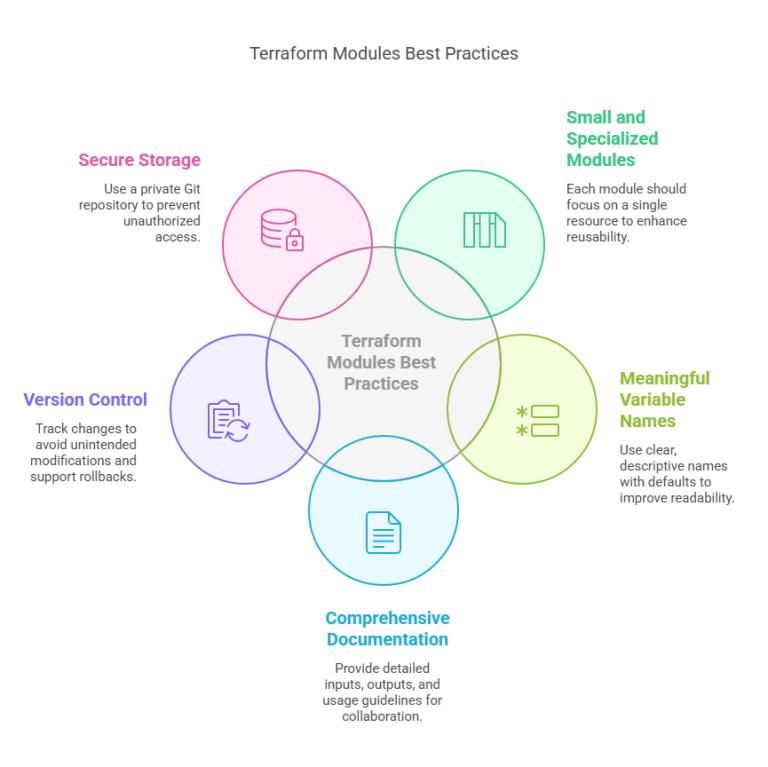
I’ve already covered this in a dedicated blog post, so we won’t dive too deep here. You can refer to it for a complete understanding of Terraform Modules. It includes:
- Key Benefits of Using Terraform Modules
- Anatomy of a Terraform Module
- Creating a Basic Terraform Module
- Advanced Terraform Module Features
- Debugging and Troubleshooting Terraform Modules
I strongly encourage you to explore it for a deeper understanding here.
3.5 Seamless CI/CD Integration
Terraform is easily integrated with GitHub Actions, Jenkins, and GitLab CI/CD to automate infrastructure provisioning and deployments. These CI/CD tools can automatically run Terraform workflows like plan, apply, and destroy whenever code changes happen. This guarantees repeatable, consistent, and version-controlled infrastructure deployments across environments.
Example: Check out the code below where Terraform is integrated with GitHub Actions.
name: Terraform CI/CD

on:
  push:
    branches:
      - main

jobs:
  terraform:
    runs-on: ubuntu-latest
    steps:
      - name: Checkout repository
        uses: actions/checkout@v3

      - name: Setup Terraform
        uses: hashicorp/setup-terraform@v2

      - name: Terraform Init
        run: terraform init

      - name: Terraform Plan
        run: terraform plan

      - name: Terraform Apply
        run: terraform apply -auto-approve
This GitHub Actions workflow automatically initializes Terraform, runs a plan, and applies changes when code is pushed to the main branch. Similar integrations can be done with Jenkins and GitLab CI/CD, enabling automated and scalable infrastructure management.
3.6 Security and Compliance Automation
3.6.1 Terraform’s Role in Enforcing Security Policies and Policy as Code
Terraform is also significant in implementing security policies by prescribing IAM roles, security groups, and access control in infrastructure as code (IaC). Through coding of security policies, Terraform allows for consistency, compliance, and least privilege access in cloud environments.
For advanced security management, Terraform Sentinel offers policy as code functionality, enabling organizations to implement custom compliance rules prior to applying infrastructure changes. Sentinel assists in limiting unauthorized resource creation, enforcing encryption policies, and validating IAM permissions, providing secure and compliant infrastructure deployments. Let’s see below example.
Example: Enforcing IAM Policies with Terraform
resource "aws_iam_policy" "restrict_s3_access" {
  name        = "RestrictS3Access"
  description = "Deny all non-encrypted S3 bucket access"

  policy = jsonencode({
    Version = "2012-10-17"
    Statement = [{
      Effect = "Deny"
      Action = "s3:*"
      Resource = "*"
      Condition = {
        StringNotEquals = {
          "s3:x-amz-server-side-encryption" = "AES256"
        }
      }
    }]
  })
}
This Terraform configuration enforces an IAM policy that denies access to S3 buckets unless encryption (AES256) is enabled, improving security and compliance.
3.6.2 Using tfsec and Checkov for Terraform Security Scanning
To enhance Terraform security, tools like tfsec and Checkov perform static analysis on Terraform configurations to detect misconfigurations, security vulnerabilities, and compliance issues before deployment.
- tfsec scans Terraform code and identifies insecure IAM policies, public S3 buckets, overly permissive security groups, and other risks.
- Checkov provides deep policy enforcement by validating Terraform against industry standards like CIS benchmarks, NIST, and SOC 2.
By integrating these tools into CI/CD pipelines, DevOps teams can proactively fix security issues, ensuring safer infrastructure deployments.
3.7 Terraform’s Evolution and Relevance in 2025
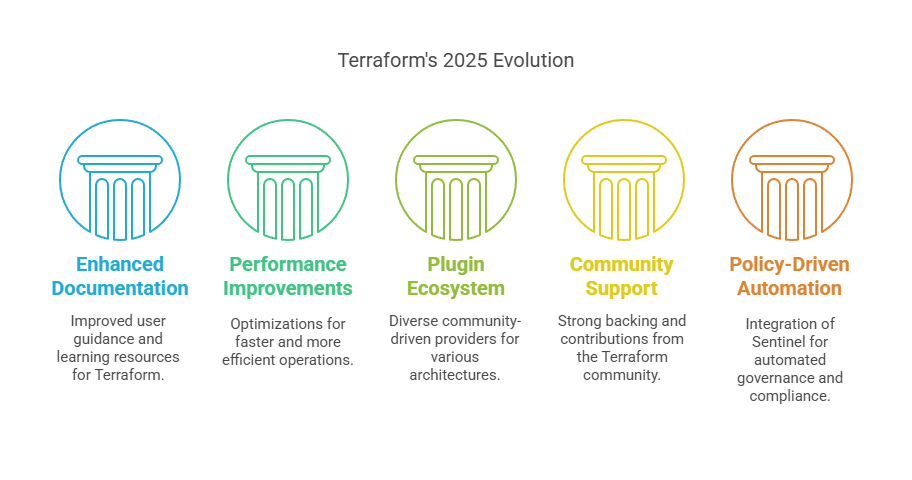
In 2025, Terraform continues to be a dominant Infrastructure as Code (IaC) tool, evolving with better documentation, improved performance, and an extensive plugin ecosystem. The Terraform Registry has expanded, offering a rich collection of community-driven providers for Kubernetes, Docker, and serverless architectures, making it easier to manage diverse infrastructure.
Despite alternatives like Pulumi and AWS CDK, Terraform remains highly relevant due to its declarative approach, cloud-agnostic capabilities, and strong community support. Its mature ecosystem, policy-driven automation (Sentinel), and broad enterprise adoption ensure that Terraform remains the go-to choice for infrastructure provisioning and management in modern DevOps workflows.
4. Conclusion
As we reach the end of this blog, let’s summarize all seven key points here.
- Multi-Cloud Deployment – Easily manage infrastructure across AWS, Azure, GCP, and more.
- Declarative Infrastructure as Code (IaC) – Define infrastructure in a human-readable, version-controlled way.
- State Management & Version Control – Maintain consistency and track infrastructure changes efficiently.
- Modularity and Reusability – Use Terraform modules for scalable and reusable configurations.
- Seamless CI/CD Integration – Automate deployments with GitHub Actions, Jenkins, and GitLab CI/CD.
- Security and Compliance Automation – Enforce IAM policies, security groups, and governance controls.
- Growing Ecosystem & Community Support – Expanding providers and plugins for diverse infrastructure needs.
Terraform is set to play a crucial role in the future of infrastructure management, adapting to emerging trends like multi-cloud strategies, AI-driven automation, and edge computing. As businesses increasingly adopt multi-cloud architectures, Terraform’s cloud-agnostic nature ensures seamless provisioning and management across AWS, Azure, and GCP.
With the rise of AI-driven automation, Terraform is integrating with machine learning models to optimize infrastructure provisioning, cost efficiency, and predictive scaling. Additionally, in the era of edge computing, Terraform simplifies the deployment of distributed, low-latency infrastructure for IoT and 5G applications. Its growing ecosystem and automation capabilities will keep it at the forefront of DevOps and infrastructure as code in the years ahead.
Next Step
Now that you understand why Terraform is a game-changer, it’s time to dive deeper into best practices for enterprise deployments. Learn how to structure your Terraform code, manage state files securely, and implement policy-driven automation for large-scale infrastructure.
Explore Terraform with Kubernetes and Helm to automate containerized workloads efficiently. Leverage Terraform’s integration with Helm charts to simplify Kubernetes deployments.
We’d love to hear from you! Share your Terraform experiences, challenges, or insights in the comments, and let’s continue the conversation on mastering Infrastructure as Code.
Explore my other articles on DevOps and Cloud for more insights, tips, and tutorials. Stay informed and enhance your skills with practical content designed to boost your knowledge. Happy learning!