Linux OOM Killer: Why Your Application Exits Suddenly With No Logs (Interview Scenario 3)
Introduction
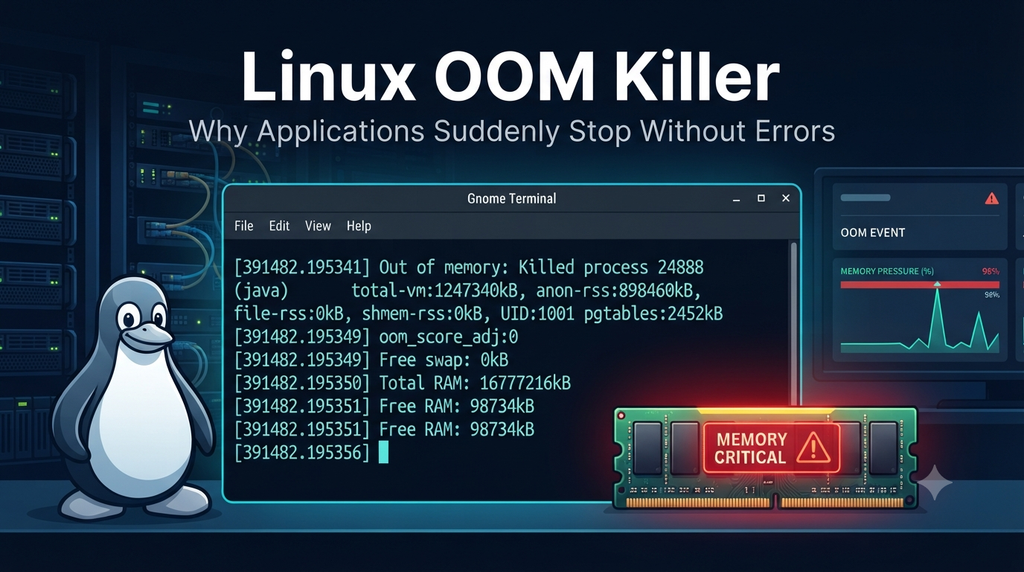
Few production issues are as frustrating as an application that simply disappears. There is no stack trace, no error in the app logs and no warning. The process is just gone.
If you work in L1, L2 or L3 support, SRE or DevOps, you will face this sooner or later. It is also a favorite Linux interview scenario, because it tests whether you know what happens when a server runs out of memory (Linux OOM Killer).
This article shows how to think about the problem, which commands to run, and how to answer the follow-up questions an interviewer may ask.
Before Troubleshooting: Think Beyond the Application
Let’s look at this scenario and understand what the interviewer is actually testing, what clues point toward Linux OOM (Out of Memory), and how you should approach troubleshooting before jumping to conclusions.
Imagine an application running on a Linux server suddenly stops with the following symptoms:
- The process is no longer running
- There is no stack trace
- The application logs show no error or shutdown message
- The logs simply end at some point
The first instinct is usually to investigate the application itself. But in Linux, the application may not have decided to terminate at all. Something at the OS level could have killed it.
That’s where understanding the Linux OOM Killer becomes important.
What the Interviewer Is Testing
This scenario tests your understanding of the Linux OOM (Out Of Memory) Killer. The interviewer wants to see whether you:
- Know that Linux can kill processes on its own when memory runs out
- Look beyond application logs and check kernel logs
- Investigate before you restart
How to Think About It
When the system runs out of available memory, the Linux kernel needs to reclaim memory to keep the system running. If it cannot free enough memory, the OOM (Out of Memory) Killer may select a process and terminate it to free up resources.
This termination happens at the kernel level, outside the application’s control. As a result, the application cannot handle the shutdown gracefully, write a final log entry, or generate a stack trace. This explains why the application logs may appear completely normal until they suddenly stop.
TIP
If an application dies silently, check the kernel logs before you check anything else.
Troubleshooting Linux OOM: From Symptoms to Root Cause
Let’s start the investigation and walk through how to approach this scenario systematically. The goal isn’t just to confirm that the OOM Killer terminated the application, but to gather enough evidence to identify the cause and build a credible RCA (Root Cause Analysis).
Step 1: Search kernel messages for OOM events
Start by checking whether the Linux kernel reported any Out of Memory (OOM) events.
$ dmesg | grep -i oom
[482193.827341] java invoked oom-killer: gfp_mask=0x140cca, order=0, oom_score_adj=0
[482193.827395] oom-kill:constraint=CONSTRAINT_NONE,nodemask=(null),cpuset=/,
mems_allowed=0,global_oom,task_memcg=/,task=java,pid=28471,uid=1001
[482193.827412] Out of memory: Killed process 28471 (java) total-vm:8421936kB, anon-rss:6231840kB, file-rss:1200kB, shmem-rss:0kBWhat should you look for?
- oom-killer indicates that the kernel invoked the OOM handling mechanism.
- task=java identifies the process involved in the OOM event.
- pid=28471 gives you the process ID.
- Killed process 28471 (java) confirms that the kernel terminated the Java process.
- anon-rss:6231840kB indicates the approximate resident anonymous memory used by the process at the time of termination.
This is your first strong evidence that the application was terminated by the Linux kernel rather than shutting down on its own.
Step 2: Check kernel logs through journald
$ journalctl -k
Nov 19 09:42:17 prod-app-01 kernel: java invoked oom-killer: gfp_mask=0x140cca, order=0, oom_score_adj=0
Nov 19 09:42:17 prod-app-01 kernel: oom-kill:constraint=CONSTRAINT_NONE,nodemask=(null),cpuset=/,mems_allowed=0,global_oom,task_memcg=/,task=java,pid=28471,uid=1001
Nov 19 09:42:17 prod-app-01 kernel: Out of memory: Killed process 28471 (java) total-vm:8421936kB, anon-rss:6231840kB, file-rss:1200kB, shmem-rss:0kBjournalctl shows kernel messages through the systemd journal. It is useful when the dmesg buffer has been overwritten, or when you need older entries or timestamps. You can narrow the output with grep -i oom or a time filter such as –since.
$ journalctl -k --since "2026-11-19 09:00" --until "2026-11-19 10:00"
Nov 19 09:42:16 prod-app-01 kernel: Memory cgroup out of memory: Killed process 28471 (java)
Nov 19 09:42:17 prod-app-01 kernel: oom-kill:constraint=CONSTRAINT_NONE task=java pid=28471
Nov 19 09:42:17 prod-app-01 kernel: Out of memory: Killed process 28471 (java) total-vm:8421936kB, anon-rss:6231840kBUsing the time filter helps you focus on the incident window and correlate kernel events with application logs, monitoring alerts, or other system activity.
Step 3: Identify the Killed Process and Correlate the Timeline
Once you find the OOM-related messages, focus on extracting the evidence that helps explain what happened.
Look for:
- Process name and PID: Which process was selected by the OOM Killer?
- Timestamp: When was the process terminated?
- Memory statistics: What does the kernel report about memory usage and availability at that time?
- Application timeline: When did the application logs stop, and when was the process last observed running?
Correlate the kernel event timestamp with the application log timestamps. If the OOM event aligns with the time the application disappeared, you have strong evidence that the kernel terminated the process.
However, remember that identifying the OOM event explains how the application stopped, not necessarily why the server ran out of memory. Compare the timestamp with when the application stopped logging. If they match, you have your answer.
Step 4: Investigate Why the System Ran Out of Memory
Confirming an OOM kill is only the first part of the investigation. The next step is to identify what caused the memory pressure in the first place.
Some possible causes include:
- Memory leak: The application continuously allocates memory but fails to release it.
- Excessive workload: Too many processes or memory-intensive services are running on the same server.
- Traffic spike: A sudden increase in requests causes the application to consume more memory than usual.
- Insufficient memory allocation: The server or container has limited memory available for the workload.
These are potential causes, not confirmed findings. You need to validate them using memory metrics, historical monitoring data, application behavior, and workload patterns before concluding your RCA.
What Actually Happened?
The application was terminated by the Linux OOM Killer after the system exhausted its available memory. Since the termination was initiated by the kernel, the application had no opportunity to perform a graceful shutdown, log the termination event, or generate a stack trace.
Resolution and Verification
- Confirm the OOM event: Review
dmesgorjournalctl -kto verify that the kernel terminated the application. - Address the underlying memory issue: Investigate memory leaks, excessive workload, insufficient memory allocation, or resource contention. Apply the appropriate corrective action based on your findings.
- Restart the application: Once the underlying issue has been addressed, restart the application and verify that it is running normally.
- Monitor memory consumption: Track memory usage, available memory, and application consumption to identify abnormal growth or recurring memory pressure.
- Validate the fix: Continue monitoring kernel logs and application health to confirm that no new OOM events occur and that the application remains stable under normal workload.
RCA Takeaway
Restarting the application restores service, but it does not resolve the underlying problem. A proper RCA must identify why memory was exhausted and what corrective action prevents the incident from recurring.
Common Troubleshooting Mistakes to Avoid
During an OOM incident, it’s easy to focus on restoring the application quickly and overlook the actual cause. These are some common mistakes engineers make during this type of investigation:
- Restarting without investigating memory usage: Restarting the application may temporarily restore service, but if the underlying memory issue remains unresolved, the process may be killed again.
- Relying only on application logs: When a process is terminated by the kernel, application logs may not contain any useful information about the termination. Always investigate kernel logs as well.
- Assuming the application is at fault: The application may simply be the victim of memory pressure caused by other processes, workloads, or resource constraints on the server.
Key Takeaways for Linux Interviews
If you encounter a scenario where an application suddenly disappears without any error logs or graceful shutdown messages, keep these points in mind during your investigation:
- Silent process termination: If a process disappears without leaving application errors, consider whether the Linux OOM Killer terminated it.
- Start with kernel logs: Use
dmesg | grep -i oomandjournalctl -kto investigate OOM-related events. - Understand OOM victim selection: Linux uses mechanisms such as
oom_scoreandoom_score_adjwhen evaluating processes for termination. Memory consumption is an important factor, but victim selection is not based on memory usage alone. - Find the underlying cause: Confirming an OOM kill explains why the process stopped, but your investigation isn’t complete until you identify what caused the memory pressure.
Interview Tip
Don’t jump straight to restarting the application. Explain how you would validate an OOM event using kernel logs, correlate the timestamp with the application failure, and then investigate why the system ran out of memory.
Follow-up Questions: Linux OOM Troubleshooting
Below are common follow-up questions an interviewer might ask:
Q1. How can I identify which process was killed by the OOM Killer?
Check dmesg or journalctl -k for OOM-related entries. The kernel logs usually include the process name, PID, and memory statistics of the process that was terminated.
Q2. Does high memory utilization always mean the server is going to run out of memory?
No. Linux uses available memory for cache and buffers, which can be reclaimed when needed. Check free -h and focus on available memory rather than just used memory.
Q3. What is the difference between oom_score and oom_score_adj?
oom_score represents a process’s likelihood of being selected by the OOM Killer, while oom_score_adj allows that score to be adjusted to make a process more or less likely to be selected.
Q4. Can the OOM Killer terminate a process even when the server has free memory?
Yes. A process can be terminated by a memory cgroup or container limit even when the host still has available memory. Investigate cgroup memory limits and container memory usage in addition to host-level metrics.
Q5. How can I determine whether the OOM event was caused by a memory leak?
Review historical memory metrics and determine whether the process’s memory consumption was continuously increasing without returning to its normal baseline. Correlate the trend with application workload and memory behavior before concluding that a leak exists.
Q6. What is the difference between a system-wide OOM and a cgroup OOM?
A system-wide OOM occurs when the host faces severe memory exhaustion. A cgroup OOM occurs when a workload exceeds the memory available within its assigned cgroup limit, even if the host still has free memory.
Q7. Does adding more RAM always resolve OOM issues?
Not necessarily. Additional memory may reduce pressure, but if the underlying problem is a memory leak, uncontrolled workload growth, or an incorrectly configured memory limit, the issue may return.
Q8. How can I prevent recurring OOM incidents?
Identify the underlying cause, optimize application memory usage, review workload capacity, configure appropriate memory limits, and establish monitoring and alerts for memory pressure and abnormal memory growth.
Q9. What happens if the OOM Killer terminates a critical process?
The affected service may become unavailable until it is restarted or recovered. This is why process supervision, service recovery policies, redundancy, and appropriate resource planning are important in production environments.
Q10. Can I prevent a process from being killed by the OOM Killer?
Linux provides oom_score_adj to influence victim selection, but protecting a process does not solve memory exhaustion. Protecting one process can increase the risk to other workloads or the overall system.
Q11. How can I check whether swap is contributing to the memory problem?
Use free -h, vmstat, and monitoring metrics to inspect swap usage and activity. High swap utilization alone does not prove active memory pressure; investigate ongoing swap-in and swap-out activity and its impact on performance.
Q12. What should I include in an OOM incident RCA?
Include the affected process, incident timeline, kernel OOM evidence, memory utilization trends, identified trigger, impact, resolution, and preventive actions. Distinguish the immediate termination mechanism from the underlying cause of memory exhaustion.
Conclusion: Think Beyond the Application
When an application suddenly disappears without a stack trace, error message, or graceful shutdown, don’t immediately assume there’s a problem with the application code. Sometimes, the real culprit is the Linux kernel.
Start by checking kernel logs for OOM events, identify the process that was terminated, and investigate what caused the memory pressure. Once you’ve established the root cause and addressed it, restart the application and verify that the system remains stable.
Tip
Good troubleshooting isn’t just about bringing an application back online. It’s about understanding why it failed and making sure the same incident doesn’t happen again.
This mindset will help you investigate production incidents more effectively and demonstrate stronger troubleshooting skills in Linux and SRE interviews.
Take Your Linux Troubleshooting Skills Further
Want to practice more real-world Linux troubleshooting scenarios and prepare for production support or Linux interviews?
Check out my Linux Scenario-Based Interview Preparation Kit, designed to help you move beyond theoretical questions and develop practical troubleshooting skills.
Inside the complete kit, you’ll find scenario-based questions covering real-world Linux problems, practical investigation approaches and detailed explanations.
Get a free sample chapter before purchasing to see the content and approach for yourself.
Explore the complete Linux Interview Preparation Kit: Ultimate Linux Interview Survival Kit
Download the free sample: [FREE] Linux Scenario-Based Interview Kit